What Are the Benefits of Using a Wireless Display Monitor
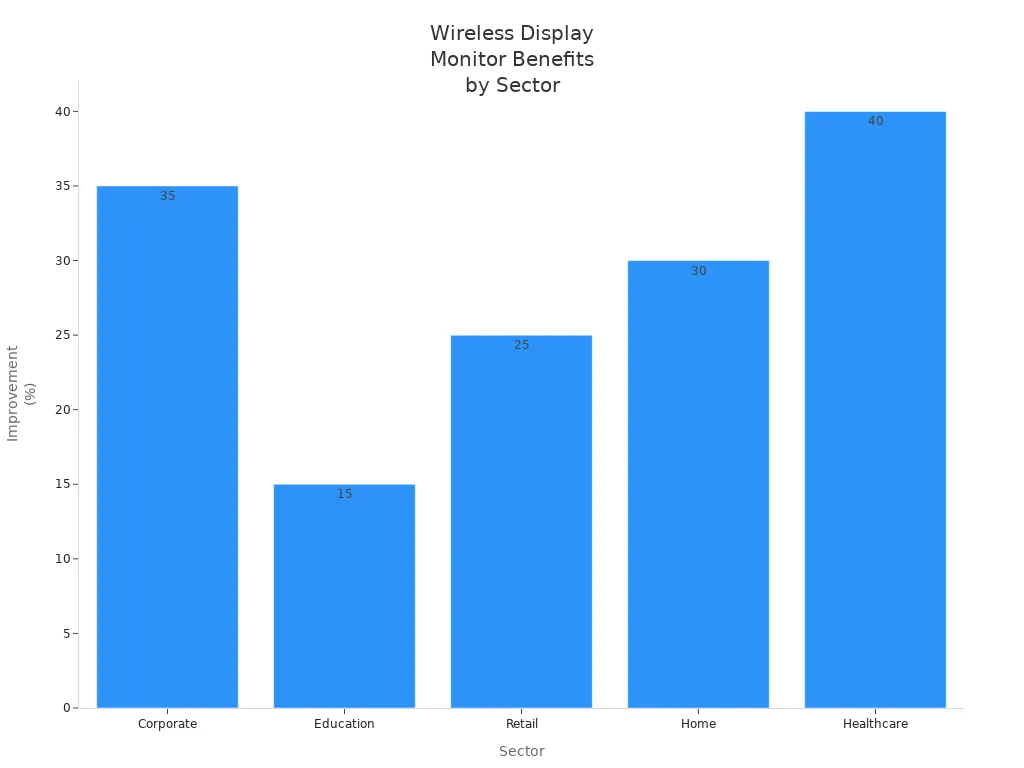
A wireless display monitor lets you show your screen without plugging in cables. You can switch between devices, move around freely, and set up quickly. Many people say it makes work, learning, and home life easier. Take a look at the chart below—companies see a 35% jump in presentation efficiency, and homes enjoy 30% more convenience.
You might find your desk less crowded and your daily tasks more fun with this simple upgrade.
Key Takeaways
Wireless display monitors eliminate messy cables, keeping your workspace neat and organized.
You can easily switch between devices, enhancing productivity during meetings and presentations.
Setting up a wireless display monitor is quick and simple, saving you time and effort.
These monitors support multiple devices and operating systems, ensuring compatibility and flexibility.
Enjoy the freedom to move your monitor anywhere, making work and entertainment more enjoyable.
Wireless Display Monitor Flexibility
Work Flexibility
You want to move around your workspace without dragging cables behind you. A wireless display monitor lets you do just that. You can set up your screen anywhere in the room and keep working or presenting without worrying about losing your connection. This freedom makes it easier to rearrange your desk or share your screen with coworkers. You can switch between your laptop and tablet in seconds, which helps you stay productive during busy meetings or group projects.
Tip: If you work in a fast-paced office, you can quickly relocate your monitor to another spot or connect a different device. You save time and avoid the hassle of unplugging and replugging cables.
Home and Office Mobility
Imagine carrying your monitor from your home office to the living room with no wires to trip over. You can set up your wireless display monitor wherever you need it, whether you want to watch a movie on the couch or join a video call at your kitchen table. You get more freedom to design your space and use your devices where they work best for you. This flexibility makes your home and office feel less cluttered and more comfortable.
Move your monitor between rooms with ease
Set up for work, play, or learning in any spot
Enjoy a cleaner, more organized environment
Device Versatility
You probably use more than one device every day. A wireless display monitor works with many types of devices, so you can connect your phone, laptop, or tablet without extra adapters. You can even use different brands and operating systems. Here’s a quick look at how different devices connect:
Supported Protocols | |
|---|---|
Windows | Miracast |
Apple | AirPlay |
Chromebook | Chromecast |
You can switch from your Windows laptop to your iPhone or Chromebook with just a few taps. This versatility means you don’t have to worry about compatibility issues. You get a seamless experience, no matter what device you use.
Clutter-Free Setup and Easy Connection
No Cables Needed
You know how messy cables can get. They tangle under your desk, collect dust, and make it hard to move things around. With a wireless display monitor, you skip all that hassle. You don’t need to search for the right cord or worry about plugging it into the correct port. Your workspace stays neat, and you can move your monitor wherever you want. This setup makes your room look cleaner and helps you focus on what matters.
Tip: If you want a tidy desk, go wireless. You’ll spend less time organizing cables and more time getting things done.
Quick Installation
Setting up a wireless display monitor is much faster than dealing with a wired one. You don’t have to run cables across the room or figure out which wire goes where. Most wireless monitors connect in just a few steps. You turn on your monitor, choose your device, and start sharing your screen. The process saves you time and energy, especially if you move your monitor often.
Here’s what makes installation easier:
Simple connection steps
Flexible placement anywhere in the room
You might run into a few challenges, though. Sometimes, the video looks pixelated or the sound stutters. Connection problems can happen if there’s interference from other electronics. These issues don’t happen often, but it’s good to know what to expect.
Minimal Desk Space
A wireless display monitor helps you reclaim your desk. You don’t have cables running everywhere, so you can use your space for other things. Your monitor sits neatly on your desk, and you have room for your laptop, books, or coffee mug. You can even move your monitor to a shelf or another table if you need more space.
Enjoy a cleaner, more open workspace
Move your monitor to fit your needs
Make your desk work for you
A clutter-free setup makes your day smoother and your workspace more inviting.
Multi-Device Compatibility
Connect to Multiple Devices
You probably use more than one device every day. A wireless display monitor gives you the freedom to connect your laptop, tablet, or phone. Most models let you link up with just one device at a time, so you don’t have to worry about screen confusion. You can share your work or entertainment from the device you choose. If you want to switch, you simply disconnect and connect another device. This setup keeps things simple and helps you stay focused.
Connect your favorite device
Avoid cluttered screens
Switch easily when needed
Note: Some wireless display monitors offer special kits that let you connect HDMI and USB-C transmitters at the same time, making it easier for different users to share content.
Cross-Platform Support
You might wonder if your device will work with a wireless display monitor. Most adapters and monitors support popular operating systems. For example, the Microsoft Wireless Display Adapter works with Windows 8 and newer versions. It does not support Windows 7 or older systems. You need hardware that supports Miracast for proper use. Many monitors also work with Apple and Chromebook devices, so you can share your screen no matter what you use.
Here’s a quick look at compatibility:
Operating System | Supported? |
|---|---|
Windows 8+ | Yes |
Windows 7- | No |
macOS | Yes |
Chrome OS | Yes |
You can connect your device and start sharing without worrying about complicated setup steps.
Seamless Switching
Meetings and group work often need quick changes between presenters. Some wireless display monitors make switching smooth and fast. Devices like the EZCast Pocket 2T1R let you use a “pair” button on each transmitter, so you can manage screen mirroring without interruptions. You can connect HDMI and USB-C transmitters at the same time, which helps different presenters share their screens easily. The ScreenBeam 1100 Plus lets you switch control without disconnecting, so meetings stay on track and transitions happen without delays.
Use the “pair” button for instant switching
Share screens from different devices
Keep meetings flowing smoothly
Tip: Seamless switching means you spend less time on tech and more time sharing ideas.
Collaboration and Productivity Benefits
Screen Sharing
A wireless display monitor changes the way you share your screen. You can connect your device without searching for the right cable or adapter. This makes meetings and classes run smoother. You just tap a button and your content appears for everyone to see. Here’s what you get with wireless screen sharing:
Share your screen from anywhere in the room
Connect different devices, like laptops, tablets, or phones
Switch between presenters quickly, which keeps everyone engaged
Move around while teaching or presenting, instead of staying near the monitor
You can even connect up to eight devices to one receiver. This means you can switch sources fast, without touching any equipment. Teachers and students love this because it saves time and keeps lessons moving.
Group Presentations
You want your group presentations to feel smooth and organized. A wireless display monitor helps you do that. You and your teammates can share ideas faster, even if some people join from home. Hybrid work becomes easier because everyone can connect, no matter where they are. Here’s what makes group presentations better:
Share content quickly, so you don’t waste time switching cables
Keep your meeting space neat, with no wires on the table
Let remote workers join in and present their ideas
Switch between presenters without stopping the flow
Tip: If you want to impress your audience, use a wireless display monitor to keep your presentation running without delays.
Real-Time Teamwork
You need tools that help your team work together, whether you’re in the office or working from home. Technologies like Miracast and Intel Wireless Display make this possible. They let you share content instantly and use business apps right on the big screen. Here’s a quick look at what these technologies offer:
Feature | Description |
|---|---|
Wireless Projection | Share content across devices for real-time teamwork |
Microsoft Whiteboard Integration | Brainstorm and collaborate, even if your team is in different locations |
Work together in the office or remotely, with no extra steps | |
Business App Support | Run important apps for meetings and projects directly on the display |
A wireless display monitor helps your team stay connected and productive. You spend less time fixing tech problems and more time working together.
Entertainment and Gaming with Wireless Display Monitors

Streaming Media
You want to watch your favorite shows or movies without fuss. A wireless display monitor lets you stream content from your phone, tablet, or laptop right to your TV or big screen. You can relax on the couch and control everything from your device. You do not need to worry about cables or adapters. Many people choose these monitors for home theaters because they make movie nights simple and fun. You can also play music videos or share vacation photos with your family in seconds.
When you pick a monitor for streaming, you might think about:
The type of content you want to display
Compatibility with your devices
The size and mounting options for your space
Your favorite platforms, like Apple, Windows, or Android
Wireless Gaming
You can play games on a big screen without wires. This setup feels exciting and modern. However, you may notice some lag or stuttering, especially if other devices use the same network. Wired gaming usually gives you faster speeds and less delay. Many gamers prefer wired connections for the best performance.
Here’s what you might experience with wireless gaming:
Lag spikes and stuttering can happen because of interference
Input lag may reach 100 to 200 milliseconds, which feels slow during fast games
Wireless monitors like the ViewSonic VG1656N are easy to set up but may not match wired quality
If you want convenience over perfect speed, wireless gaming can still be a good choice.
Family and Group Use
A wireless display monitor brings people together. You can turn your living room into a mini theater or host a game night. Kids can play interactive games or sing along with videos. Family gatherings become more fun when you share photos or slideshows on a big screen.
Activity Type | Description |
|---|---|
Great for watching movies together as a family. | |
Educational play | Lets kids enjoy interactive games and sing-along videos. |
Small gatherings | Perfect for sharing photo albums, videos, or presentations during family events. |
You can find models like the ViewSonic VG1656N, which works with Mac, Windows, and Linux, and offers up to three hours of battery life. This makes it a smart pick for families who want flexibility and easy sharing.
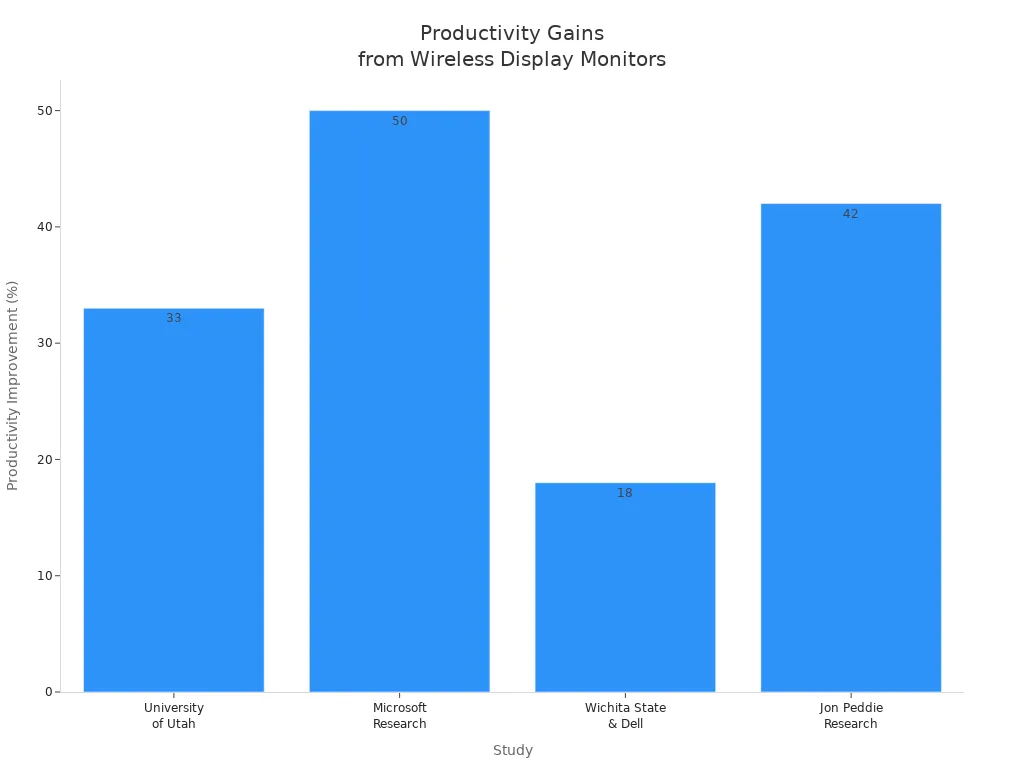
You get more done with a wireless display monitor. Studies show users make fewer mistakes and feel happier with dual screens. Take a look at the chart below—productivity can jump up to 50% for complex tasks.
When you choose a monitor, check these compatibility factors:
Compatibility Factor | Description |
|---|---|
Resolution and Refresh Rate | 1080p@60Hz is standard; 4K@30Hz is best for future use. |
Latency | Under 100ms works for video; under 50ms is better for teamwork. |
Transmission Band | 5 GHz is fast and reliable; 60 GHz needs clear sight. |
HDCP Compliance | Needed for protected content and 4K HDR. |
Think about your needs for work, play, or family time. You might find a wireless display monitor makes your day easier and your space neater.
FAQ
What is a wireless display monitor?
A wireless display monitor lets you show your device’s screen without using cables. You can connect your laptop, tablet, or phone and share content easily. This setup helps you move around and keep your space tidy.
What devices can I use with a wireless display monitor?
You can use most laptops, tablets, and smartphones. Many monitors support Windows, macOS, Chrome OS, and Android. Some even work with iPhones and iPads. Always check the monitor’s compatibility list before you buy.
What makes a wireless display monitor different from a regular monitor?
A wireless display monitor connects without cables. You do not need HDMI or USB cords. You get more freedom to move your monitor and switch between devices. Your desk stays neat, and setup takes less time.
What should I look for when choosing a wireless display monitor?
Look for compatibility with your devices, good resolution, and low latency. Battery life matters if you want to move it often. Check for features like screen sharing and easy switching between devices.
What are common issues with wireless display monitors?
You might see lag, stuttering, or connection drops if there is interference. Some monitors may not support every device. Try to keep your monitor close to your device for the best signal.
See Also
Understanding The Energy Efficiency Of Multi-Frequency Displays
Top Software Solutions For Enhancing LED Display Performance
Essential Tips For Selecting The Perfect Monitor For You