What is the Difference Between HD, FHD, QHD, UHD, and 8K Displays
You see a lot of terms like HD, FHD, QHD, 2K, UHD, and 8K when shopping for screens. Each one tells you how many pixels make up the display. More pixels mean sharper images. Here’s a quick look at what these terms mean:
Resolution Type | Common Name | |
|---|---|---|
HD | 720p | 1280 x 720 |
Full HD (FHD) | 1080p | 1920 x 1080 |
QHD | 1440p | 2560 x 1440 |
2K | 1080p | 2048 x 1080 |
UHD (4K) | 2160p | 3840 x 2160 |
8K | 4320p | 7680 x 4320 |
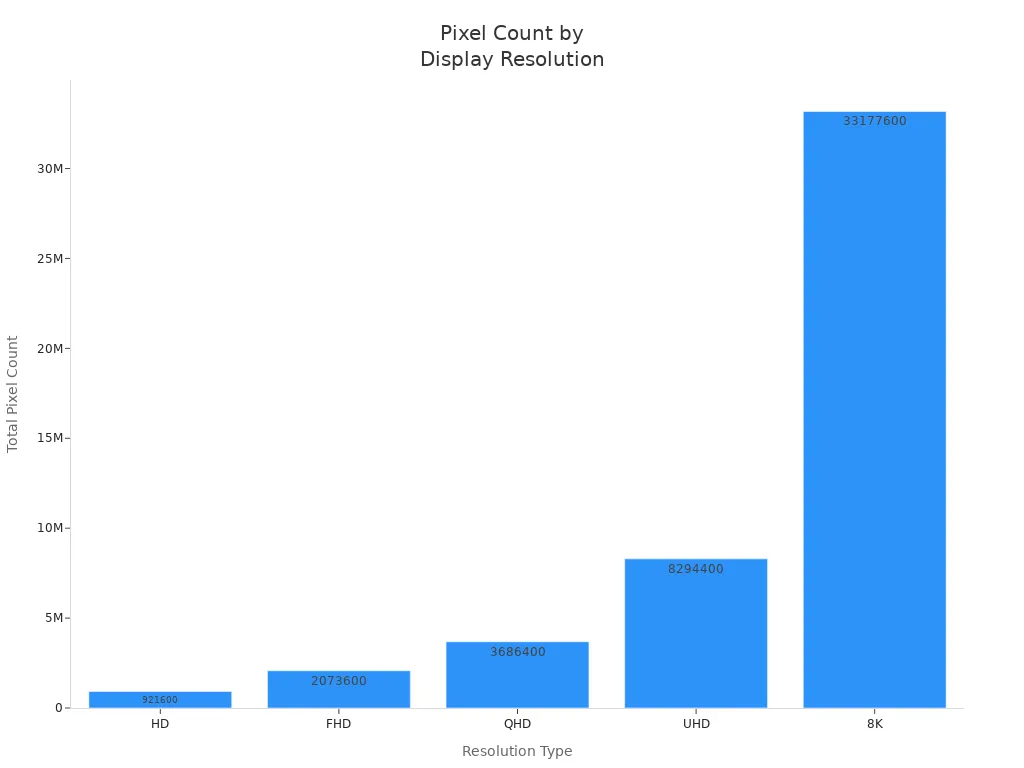
If you want a screen that looks almost flawless up close, an 8K display packs over 33 million pixels. Knowing these terms helps you pick the right screen for your favorite movies, games, or daily work.
Key Takeaways
Understand display resolutions: HD, FHD, QHD, UHD, and 8K each offer different pixel counts, affecting image clarity.
Choose FHD for everyday use: It provides a good balance of quality and affordability for streaming and browsing.
Consider UHD for larger screens: UHD (4K) offers exceptional clarity, making it ideal for movies and gaming on big displays.
8K displays provide unmatched detail: With over 33 million pixels, they are perfect for home theaters and professional applications.
Always check device compatibility: Ensure your hardware can support the resolution you choose for the best experience.
Display Resolution Basics
HD (1280 x 720)
HD stands for High Definition. You get a screen with 1280 pixels across and 720 pixels down. The aspect ratio is 16:9, which is perfect for most movies and TV shows. HD is the entry-level standard for many devices, including budget TVs, laptops, and smartphones. If you use HD, you see clear images, but you might notice some pixelation on larger screens.
Tip: HD is great for streaming videos and basic browsing, but it may not look as sharp on big screens.
Resolution | Pixel Dimensions | Aspect Ratio |
|---|---|---|
HD | 1280 x 720 | 16:9 |
FHD (1920 x 1080)
FHD means Full High Definition. You get 1920 pixels horizontally and 1080 pixels vertically. This is also a 16:9 aspect ratio. FHD is the most common resolution for TVs, monitors, and laptops. You see much sharper images compared to HD, especially when watching movies or playing games.
FHD offers four times the pixels of HD.
You enjoy crisp visuals and smooth video playback.
Resolution | Pixel Dimensions | Aspect Ratio |
|---|---|---|
FHD | 1920 x 1080 | 16:9 |
QHD (2560 x 1440) & 2K (2048 x 1080)
QHD stands for Quad High Definition. You get 2560 x 1440 pixels, which is four times the resolution of HD. The aspect ratio stays at 16:9. QHD is popular for gaming monitors and high-end smartphones. You notice sharper details and smoother graphics.
Now, let's talk about 2K. People often mix up QHD and 2K, but they are not exactly the same. 2K usually refers to 2048 x 1080 pixels, which is slightly wider than FHD. In the film industry, 2K is a standard for digital cinema. In gaming, 2K and QHD are used interchangeably, but QHD has more pixels.
Resolution | Pixel Dimensions | Pixel Count | Description |
|---|---|---|---|
QHD | 2560 x 1440 | 3,686,400 | Four times the pixels of HD |
2K | 2048 x 1080 | 2,211,840 | Used in digital cinema, less common for monitors |
QHD gives you more detail than 2K.
2K is popular in movies, while QHD is common in gaming and smartphones.
Note: QHD and 2K are close, but QHD has a higher pixel count and is better for sharp visuals.
UHD/4K (3840 x 2160)
UHD stands for Ultra High Definition, and it's also called 4K. You get 3840 x 2160 pixels, which is four times the resolution of FHD. The aspect ratio is still 16:9. UHD/4K is now the standard for most new TVs and professional monitors. You see incredibly sharp images, even on very large screens.
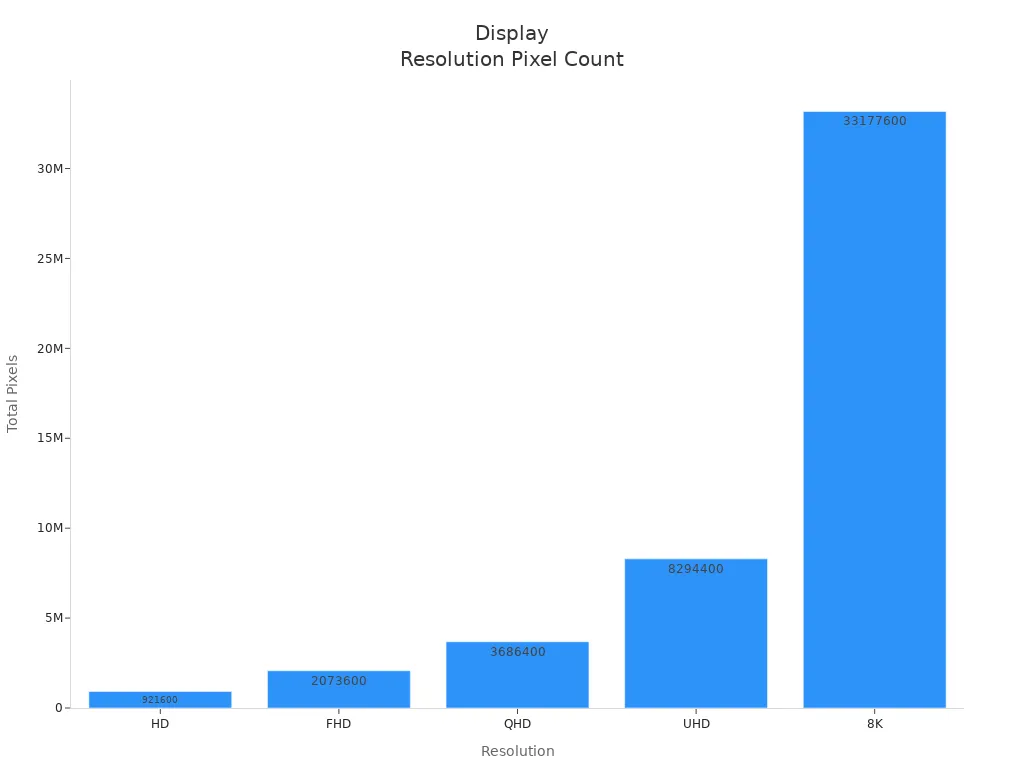
UHD/4K offers over 8 million pixels.
You notice much greater clarity and detail, especially when watching 4K content.
UHD displays are becoming more common, with over 40% of TVs now using this resolution.
Resolution | Pixel Dimensions | Pixel Count | Description |
|---|---|---|---|
UHD/4K | 3840 x 2160 | Four times the pixels of FHD |
Tip: UHD/4K is perfect for large TVs and monitors, giving you a cinematic experience at home.
8K Display (7680 x 4320)
An 8K display takes things to the next level. You get 7680 x 4320 pixels, which means over 33 million pixels on your screen. The aspect ratio is 16:9. With an 8K display, you see images that look almost lifelike, even up close. This resolution is ideal for huge TVs, professional monitors, and advanced applications like medical imaging and broadcasting.
Resolution | Pixel Dimensions | Pixel Count | Description |
|---|---|---|---|
8K | 7680 x 4320 | 33,177,600 | Eight times the pixels of UHD/4K |
8K displays require powerful hardware, like high-end graphics cards and fast internet speeds.
The market for 8K display technology is growing, especially in consumer electronics and professional fields.
You find 8K displays mostly in premium TVs and monitors, but they are becoming more accessible.
Note: If you want the sharpest image possible and have the right hardware, an 8K display gives you unmatched clarity.
Quick Comparison Table
Resolution | Pixel Dimensions | Aspect Ratio | Pixel Count |
|---|---|---|---|
HD | 1280 x 720 | 16:9 | 921,600 |
FHD | 1920 x 1080 | 16:9 | 2,073,600 |
QHD | 2560 x 1440 | 16:9 | 3,686,400 |
UHD/4K | 3840 x 2160 | 16:9 | 8,294,400 |
8K | 7680 x 4320 | 16:9 | 33,177,600 |
You can see how each step up in resolution brings a huge jump in pixel count and image quality. If you want the best visuals, look for UHD/4K or an 8K display, but make sure your device can support it.
Comparing Image Quality & Specs
Resolution Table
When you look at different screens, you might wonder what sets them apart. The answer often comes down to resolution. Here’s a quick side-by-side table that shows you the main specs for each display type:
Display Type | Resolution | Pixel Count | Aspect Ratio |
|---|---|---|---|
HD | 1280 x 720 | 921,600 | 16:9 |
FHD | 1920 x 1080 | 2,073,600 | 16:9 |
QHD | 2560 x 1440 | 3,686,400 | 16:9 |
UHD (4K) | 3840 x 2160 | 8,294,400 | 16:9 |
8K | 7680 x 4320 | 33,177,600 | 16:9 |
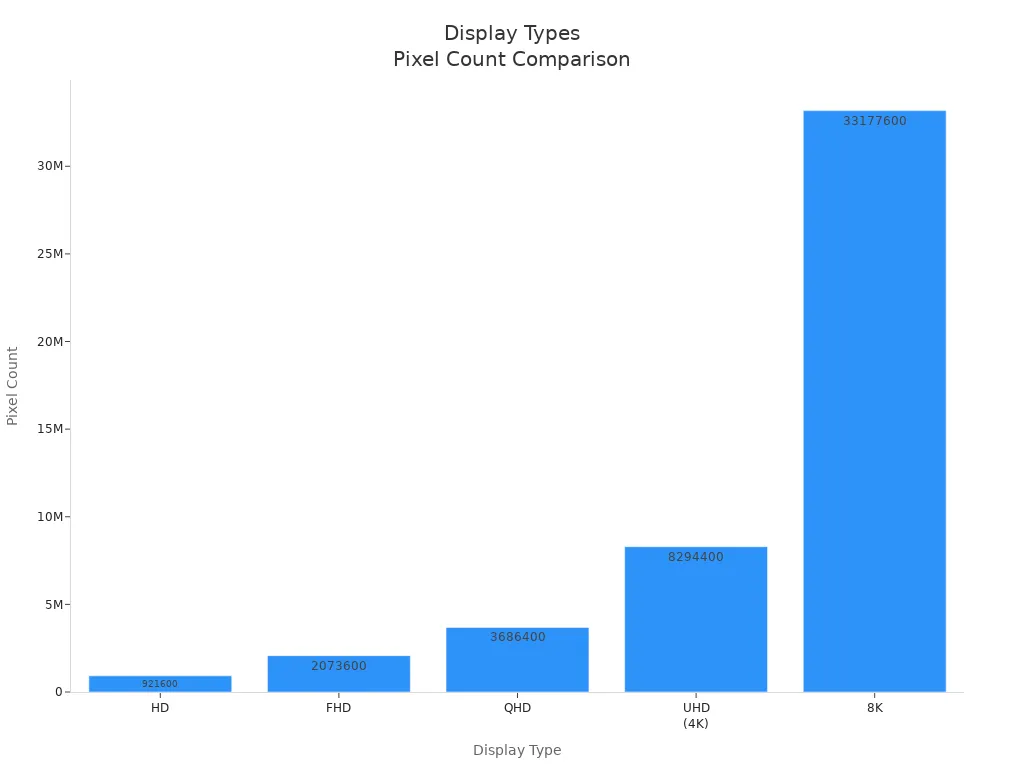
You can see that each step up in resolution means a big jump in the number of pixels. More pixels give you a sharper and more detailed image.
Pixel Density & Clarity
Pixel density, measured in pixels per inch (PPI), plays a huge role in how clear your screen looks. When you have a higher pixel density, images and text appear smoother and more lifelike. If the pixel density drops below 50-60 PPI, you start to notice individual pixels, which makes the image look blocky or pixelated.
High pixel density means sharper text and images.
Low pixel density can make things look rough, especially on large screens.
Aspect | High Pixel Density Displays | Low Pixel Density Displays |
|---|---|---|
Text Legibility | Improved visibility | Rough and jagged |
Image Detail | Sharper and more detailed | Blurry and less defined |
User Interface Smoothness | Smoother transitions | Noticeable pixel grid |
Overall Display Quality | Refined and high quality | Coarse and less appealing |
If you want the best clarity, especially for big TVs or monitors, look for screens with higher pixel density. An 8K display packs so many pixels that even up close, you won’t see any jagged edges.
Visual Differences
You might ask, “What does all this mean for what I actually see?” The difference becomes clear when you compare screens side by side. FHD screens look good for most uses, but on larger displays, you may notice less sharpness. QHD and UHD (4K) screens show more detail and smoother lines, which is great for gaming, movies, and design work. An 8K display takes it even further, revealing tiny details that lower resolutions simply can’t show.
Resolution | Pixel Count | Benefits | Limitations |
|---|---|---|---|
FHD | 2,073,600 | Affordable, Good Performance | Less sharp on large screens |
QHD | 3,686,400 | Enhanced Detail, More Screen Space | Higher cost, Needs better hardware |
UHD (4K) | 8,294,400 | Exceptional Clarity, Future-Proof | Expensive, Needs powerful hardware |
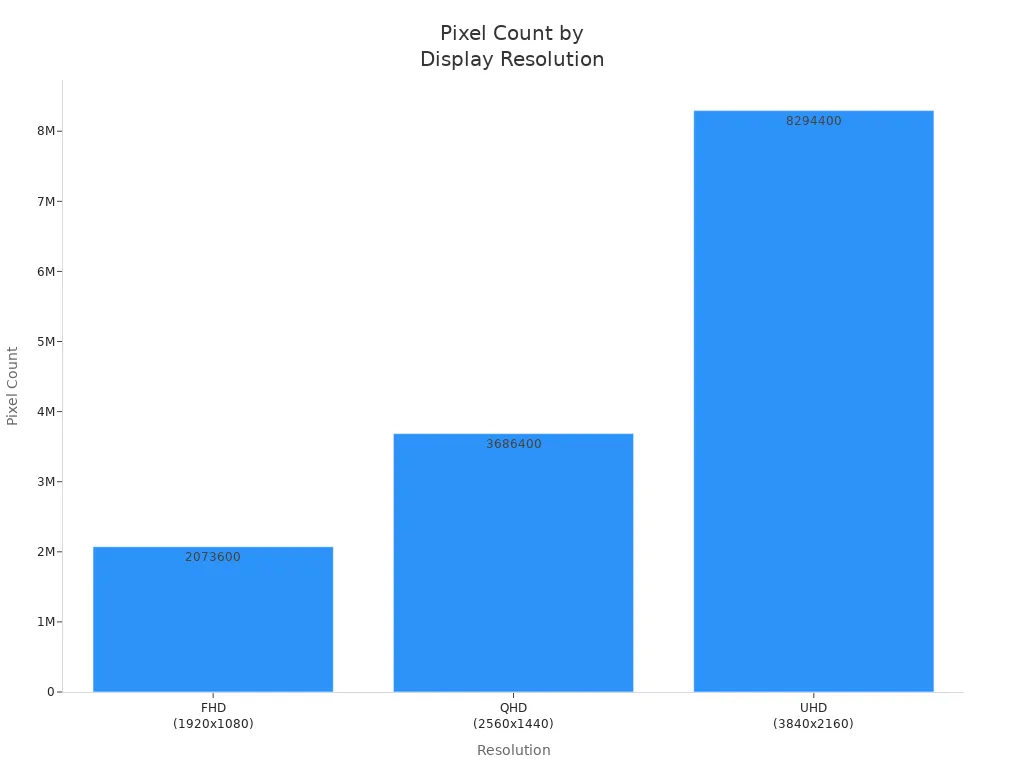
You’ll notice the biggest improvements in clarity and detail as you move up in resolution, especially if you sit close to your screen or use a large display.
Uses & Choosing the Right Display
Everyday Devices
You use screens every day, so picking the right resolution matters. Most TVs, monitors, and smartphones come with HD, FHD, or UHD displays. Here’s a quick look at what you’ll find on common devices:
Resolution Name | Common Devices |
|---|---|
8K | TVs |
UHD | TVs, monitors, smartphones |
FHD (1080p) | TVs, monitors, smartphones |
HD (720p) | TVs, smartphones |
If you mostly watch videos, browse the web, or use social media, FHD works well. UHD gives you sharper images, which is great for streaming movies or viewing photos. An 8K display is usually found on high-end TVs and offers the sharpest picture for home theaters.
Tip: For everyday use, FHD gives you a good balance of clarity and price.
Gaming & Professional Needs
Gamers and professionals need more from their screens. You want smooth gameplay and sharp visuals for editing or design work. Here’s what different resolutions offer:
Resolution | Description |
|---|---|
1920 × 1080 | Full HD (FHD) |
2560 × 1440 | Quad HD (QHD) or Widescreen QHD |
3840 × 2160 | 4K Ultra HD (UHD) |
2560 × 1080 | Ultrawide Full HD (UW-FHD) |
3440 × 1440 | Ultrawide Quad HD (UW-QHD) |
3840 × 1080 | Dual Full HD (DFHD) |
5120 × 1440 | Dual Quad HD (DQHD) |
Higher resolutions give you sharper images and more detail.
Your graphics card works harder at higher resolutions, which can lower frame rates.
Competitive gamers often pick 1080p for fast response and smooth action.
Lower resolutions reduce input lag, which helps in fast-paced games.
If you edit photos or videos, QHD or UHD screens show more detail and color accuracy. For immersive gaming or professional editing, UHD or even an 8K display can make a big difference.
Future-Proofing
You want your screen to last as technology changes. Here’s what to think about:
Your needs: Gaming, design, or just watching shows?
Screen size: Bigger screens need higher resolution for sharp images.
Hardware: Make sure your computer or console can handle the resolution.
Balance: Higher resolutions look better but need more power and cost more.
Choosing a display with higher resolution, like UHD or an 8K display, helps you stay ready for new content and devices. You get better visuals now and won’t need to upgrade soon.
Note: Think about what you do most and pick a resolution that fits your habits and your budget.
You now know what sets each display resolution apart. Here’s a quick look:
Resolution | Pixel Count | Best For |
|---|---|---|
HD | 1280 x 720 | Small screens |
FHD | 1920 x 1080 | Everyday use |
QHD | 2560 x 1440 | Gaming, creative work |
UHD (4K) | 3840 x 2160 | Large TVs, pro monitors |
8K display | 7680 x 4320 | Home theaters, big screens |
When you pick a screen, think about what you do most. Ask yourself if you need sharper images for work or play. Make sure your device can handle the resolution you want. For most people, FHD or UHD works well. If you want the sharpest image, an 8K display is the top choice.
FAQ
What does “p” mean in 720p, 1080p, and 2160p?
The “p” stands for “progressive scan.” It means the screen shows all lines of pixels in each frame. You get smoother and clearer images compared to older “i” (interlaced) formats.
What is the best display resolution for gaming?
You get the best experience with QHD (1440p) or UHD (4K) if your graphics card supports it. These resolutions give you sharp visuals and smooth gameplay. Many competitive gamers still use FHD (1080p) for higher frame rates.
What makes 8K displays special?
An 8K display gives you over 33 million pixels. You see incredible detail, even on huge screens. This resolution is great for home theaters, professional editing, and future-proofing your setup.
What should you check before buying a high-resolution display?
Make sure your device supports the resolution. Check your graphics card, streaming device, or console. Higher resolutions need more power and faster internet for streaming.
See Also
Key Features To Consider For Gaming Monitors
Understanding The Differences Between LCD And LED Screens
A Simple Guide To Multi-Frequency Displays For Laptops