Is HDR Worth It for Gaming and Movies in 2026
You probably wonder if HDR is worth your time in 2026. The answer is yes. HDR brings gaming and movies to life with richer colors, deeper blacks, and brighter highlights. High dynamic range makes every scene pop. You see more detail in shadows and bright spots. HDR gives you a more realistic experience. High dynamic range transforms visuals and makes them feel immersive. You notice the difference right away. The market shows huge growth. HDR is now a standard for digital displays. You need a compatible device and content to enjoy high dynamic range. You might worry about setup or getting the best picture. HDR makes it simple when you follow some easy steps. You will see how HDR compares to regular displays. High dynamic range changes how you see games and movies.
Key Takeaways
HDR makes what you watch look better with brighter colors and darker blacks. This helps games and movies look more real.
To use HDR, your device must work with HDR formats like HDR10+ or Dolby Vision. These formats give you the best picture.
Setting up HDR right is important. Change your display settings and check if your device has HDR certification. This will help you get the most from HDR.
Buying HDR technology is worth it. You will see better pictures, especially in dark scenes and fast action.
Watch out for some problems with HDR. Not everything will show up right, so change your settings if you need to for the best results.
What Is HDR

HDR Basics Explained
You might hear a lot about hdr when shopping for a new TV or monitor. HDR stands for High Dynamic Range. This display technology changes how you see games and movies. It boosts brightness and contrast in every image. You get more vibrant highlights and deeper shadows. Scenes look more lifelike and closer to what your eyes see in real life. HDR lets you spot details that standard screens often hide. You notice the difference right away, especially in dark or bright scenes.
How HDR Improves Visuals
HDR does more than just make things brighter. It uses new tech to push visuals to the next level. Take a look at what sets hdr apart from older displays:
Advancement Type | Description |
|---|---|
Contrast Ratios | HDR gives you much better contrast ratios than standard screens. |
Deeper Blacks | OLED panels help hdr show deeper blacks, making images pop. |
Vibrant Colors | Mini-LED backlights bring out more vibrant colors in hdr displays. |
Quantum Dot Technology | This tech boosts color accuracy and brightness for hdr visuals. |
AI-driven Enhancements | Smart features use AI to make hdr images look even better. |
HDR Standards | New hdr standards like HDR10+, Dolby Vision, and HLG improve quality. |
You see richer colors and sharper details. Games and movies feel more real. HDR makes every scene stand out.
Common HDR Formats
You need to know about hdr formats if you want the best experience. In 2026, the main hdr formats include HDR10+, Dolby Vision, and HLG. Each format has its own strengths. Some work better for streaming, while others shine in gaming. Most new TVs and monitors support several hdr formats. When you pick a device, check which formats it supports. This helps you get the most out of hdr content.
HDR vs Non-HDR Experience
Gaming Visuals Compared
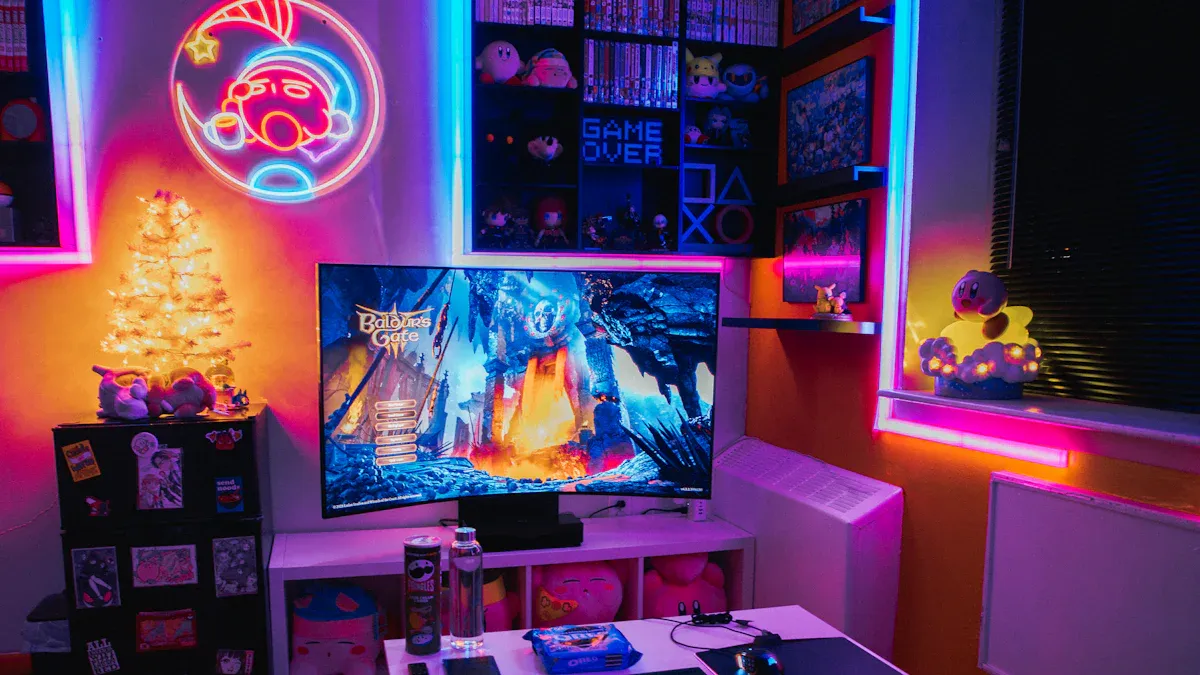
You notice the difference between hdr and non-hdr gaming right away. Games look brighter and more colorful with hdr. Shadows feel deeper, and highlights stand out. You see more detail in dark corners and bright skies. Professional reviewers say hdr changes the way you see every scene. Take a look at this table to compare hdr and standard displays in gaming:
Feature | HDR | SDR |
|---|---|---|
Contrast Ratio | Higher, better differentiation of dark and bright areas | Lower, less dynamic imagery |
Peak Brightness | Up to 10,000 nits | 100-300 nits |
Color Gamut | Billions of colors | Limited color range |
Color Depth | 10 or 12 bits per channel | Typically 8 bits |
Detail in Bright/Dark Areas | More detail and accuracy | Less detail |
You get richer colors and sharper details with hdr. Games feel more alive and realistic. You spot enemies hiding in the shadows. You see sunlight glinting off armor. Hdr makes every moment pop.
Movie Quality Differences
Movies look stunning with hdr. You see vibrant colors and lifelike skin tones. Scenes feel more dramatic because hdr boosts contrast and brightness. You notice tiny details in dark rooms and bright landscapes. Hdr lets you enjoy movies the way filmmakers intended. You see explosions light up the screen. You watch sunsets glow with deep oranges and reds. Hdr brings out the beauty in every frame.
Immersion and Realism
Hdr pulls you into the action. You feel like you are inside the game or movie. The extra detail and color make everything look real. You get lost in the story because hdr makes visuals so clear and sharp. You notice the difference when you switch from non-hdr to hdr. Your eyes adjust quickly, and you never want to go back. Hdr gives you a more immersive experience every time.
HDR Standards and Compatibility
Latest HDR Formats
You see a lot of hdr standards in 2026. Each one brings something different to your screen. HDR10 is everywhere and works for most games and movies. HDR10+ adds dynamic metadata, so scenes look even better. Dolby Vision gives you premium visuals with 12-bit color. HLG is the go-to for live broadcasts. Content creators now use HEVC and AV1 formats because they deliver high quality and work on many platforms.
In 2026, HEVC (H.265) and AV1 are the leading hdr formats. AV1 is popular because it’s efficient and royalty-free. You get great visuals and wide compatibility.
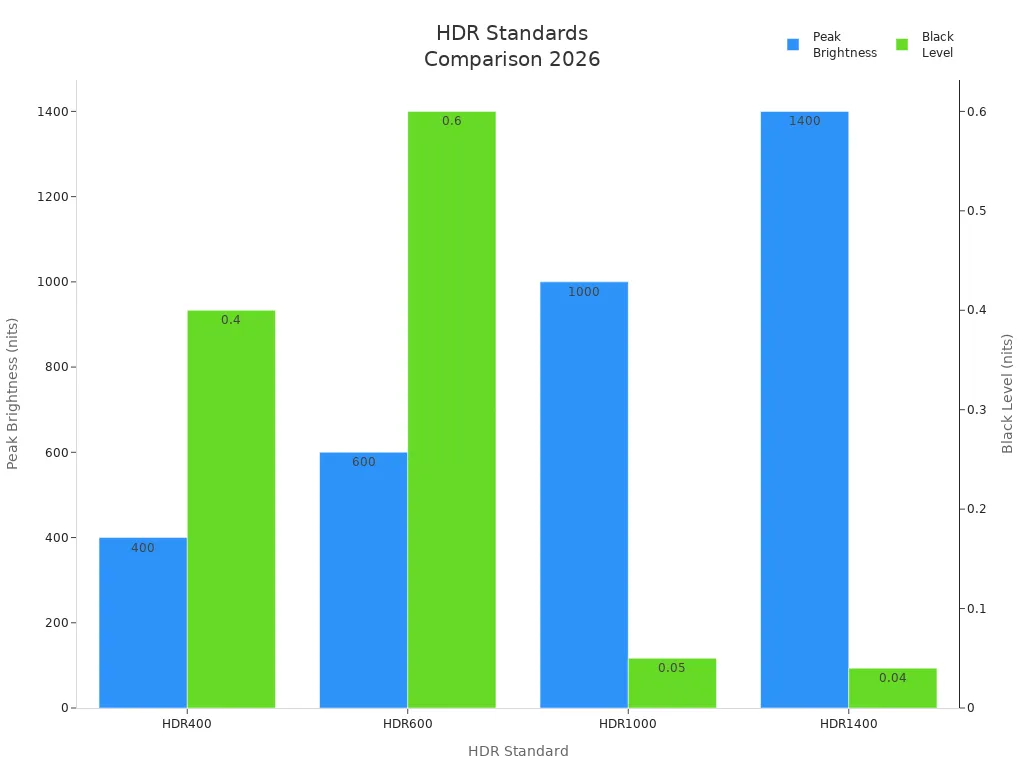
Take a look at this table to compare the main hdr standards:
Standard | Peak Brightness | Black Level | Local Dimming | Quality Assessment |
|---|---|---|---|---|
HDR400 | 400 nits | 0.4 nits | None required | Fake HDR (avoid) |
HDR600 | 600 nits | 0.6 nits | Optional | Minimal benefit |
HDR1000 | 1000 nits | 0.05 nits | Required | True HDR |
HDR1400 | 1400 nits | 0.04 nits | Required | Excellent HDR |
Device and Source Requirements
You need the right gear to enjoy hdr. Look for displays with hdr certification. HDR1000 or higher gives you true hdr. Your device should have at least 1000 nits peak brightness and 10-bit color depth. Game consoles like PlayStation and Xbox support hdr if they have a disc drive. Blu-ray players also play hdr content, especially Dolby Vision. Streaming services use AV1 and HEVC for hdr movies and shows.
Peak Brightness | Color Depth | Black Level Brightness | Color Gamut Coverage | |
|---|---|---|---|---|
HDR400 | ≥ 400 nits | 8-bit | < 0.4 nits | > 95% sRGB |
HDR600 | ≥ 600 nits | 8-bit | < 0.4 nits | > 95% sRGB |
HDR1000 | > 1000 nits | 10-bit | < 0.1 nits | > 95% sRGB |
Configuration Tips
You want hdr to look its best. Here are some quick tips:
Calibrate the EOTF curve using HCFR to match your target hdr standard.
Set greyscale steps for accurate color measurement.
Choose BT.2020 and SMPTE 2084 HDR in your display settings.
Measure greyscale steps and aim for DeltaE values below 3dE.
Check the RGB balance chart to keep colors aligned.
Tip: Always check your display’s hdr certification and update firmware for the latest hdr features.
Is HDR Worth It for Gamers and Movie Fans
Value for Different Users
You want to know if hdr makes a real difference for you. The answer depends on how you use your screen. If you love hdr games, you will see brighter colors and more detail in every scene. Shadows look deeper, and highlights shine. You spot things in dark corners that you missed before. Sports fans also notice the boost. Fast action looks smoother, and the field pops with color. Movie lovers get a treat too. Hdr movies show lifelike skin tones and glowing sunsets. You feel like you are right there in the action.
Most people who buy hdr-enabled devices feel happy with their choice. When you pick a model that fits your needs, you get the best results. Here is what users say about their experience:
You see a big jump in picture quality.
You enjoy more immersive gaming and movie nights.
You feel satisfied when you choose the right device for your setup.
Cost vs Benefit
You might wonder if hdr is worth the money. The first thing you notice is the price tag. Hdr displays cost more than regular screens. But you get a lot for your investment. Modern hdr technology, like the madVR Envy Core, uses dynamic hdr tone mapping. This feature adjusts each scene to keep details in both bright and dark areas. You see more in every frame, and the picture feels more real.
Hdr movies are mastered at very high brightness levels, sometimes up to 10,000 nits. Most home projectors only reach 50 to 150 nits. Hdr processing helps keep the light and detail, even on less powerful screens. You get a better image, even if your display is not the brightest. Over time, the benefits add up. You enjoy every game and movie more. The extra cost feels worth it when you see the results.
When HDR Matters Most
Hdr shines in certain situations. You see the biggest difference in hdr games with lots of dark scenes or bright highlights. Horror games, action titles, and sports games all look better. You spot enemies hiding in the shadows. You watch stadium lights glow during a night match. Dolby Vision 2 takes these improvements even further, making dark scenes clearer and colors richer.
Hdr movies also stand out. You notice the glow of city lights at night or the sparkle of sunlight on water. Big action scenes and dramatic moments feel more intense. If you watch a lot of movies or play games that use strong lighting effects, hdr gives you the best experience.
Tip: If you want the most from hdr, pick content and devices that support the latest standards. You will see the biggest improvements in sports, action, and dark scenes.
In the end, hdr brings real value to gamers and movie fans. You get brighter colors, deeper blacks, and more detail. The investment pays off every time you turn on your screen.
HDR Limitations and Downsides
Common Issues
You might think hdr always looks amazing, but it can have problems. Many users report issues when they turn on hdr for every game. For example, enabling RTX HDR globally can make native hdr games look way too bright. Some games, like Star Wars Outlaws, actually look better on Xbox than on PC because of hdr problems. You may also notice that hdr does not always work well with spatial audio on PS5 Pro and even on regular PS5.
Here are some common hdr issues you could face:
Games or movies look overly bright or washed out.
Some hdr content appears dim or smudgy, especially with HLG format.
Brightness levels change or flicker during live hdr channels.
Poor hdr implementation in certain games makes visuals worse, not better.
Tip: You should not enable RTX HDR for every game. Only use it for games that do not support hdr natively.
Limitations in Gaming and Movies
Hdr depends on your display’s peak brightness and color volume. If your TV or monitor cannot get bright enough, hdr highlights will not pop. You need high peak brightness, measured in nits, to see vivid scenes. Color volume matters too. It shows how many colors your screen can display at different brightness levels. If your display has low color volume, hdr scenes may look dull or inaccurate.
Some games have poor hdr support. You might see better hdr on one platform than another. Movies can also suffer if your device does not meet hdr standards. You may notice dim images or colors that do not look right.
How to Avoid Problems
You can fix many hdr problems with a few simple steps:
Power cycle your TV and hdr device. Unplug both for 60 seconds to reset the HDMI handshake.
Pick a baseline picture mode like Movie or Game Mode for testing hdr.
Turn off features like Dynamic Contrast and Live Color. These can mess up hdr color mapping.
On Samsung TVs, enable Input Signal Plus for the HDMI port you use with hdr.
Adjust the HDMI Black Level to match your device. This helps prevent washed-out colors.
If you use Apple TV, set the output to SDR base and enable dynamic range matching. This stops forced hdr output.
Note: Always check your device settings and update your firmware. Small changes can make hdr look much better.
In 2026, hdr changes how you watch games and movies. Experts say hdr should be easy to use. You will see brighter colors and deeper blacks. There is also more detail in every scene. Before you buy a new screen, think about these things:
Color gamut
Contrast ratio
4K resolution
Expert | Recommendation |
|---|---|
Mark Jensen | |
Matthew Goldman | ATSC 3.0 helps more people use hdr |
Rick Dumont | HDR looks best during live sports |
Check if your device works with hdr. Try the HDR Capability Checker to make sure. You get the best hdr when your screen and content match.
FAQ
What makes an hdr monitor better for gaming?
You get brighter colors and deeper blacks with an hdr monitor. Games look more lifelike. Shadows and highlights stand out. You spot details you might miss on a regular screen. Fast action scenes feel smoother and more exciting.
Do all games support hdr on an hdr monitor?
Not every game supports hdr. You need to check the game’s settings or description. If a game supports hdr, your hdr monitor will show better colors and contrast. Some older games may not work with hdr features.
Can I use an hdr monitor for movies and streaming?
Yes, you can watch movies and stream shows on an hdr monitor. Many streaming services offer hdr content. You see brighter highlights and richer colors. Movies look closer to what filmmakers want you to see. Just make sure your monitor supports the right hdr formats.
How do I set up my hdr monitor for the best picture?
First, connect your hdr monitor to a compatible device. Go to your display settings and turn on hdr mode. Adjust brightness and color settings. Update your monitor’s firmware if needed. Try different picture modes to find what looks best for you.
Is an hdr monitor worth the extra cost?
You get a big upgrade in picture quality with an hdr monitor. Games and movies look more immersive. If you care about visuals, the extra cost feels worth it. You enjoy every detail, from bright explosions to dark shadows.
See Also
Comparing HDR10 And Dolby Vision For Optimal Picture Quality
Understanding HDR Technology And Its Functionality Explained
Top 3 Affordable Gaming Monitors To Consider This Year