What Is Peak Brightness and Why Is It Important for TVs and Monitors
You rely on peak brightness to judge how well a display performs in any environment. High brightness levels let you see clear images on your tv or monitor, even in sunlight or a brightly lit room. Peak brightness also affects color accuracy and HDR performance. Different display types handle brightness in unique ways. For example, QLED and MicroLED displays maintain color accuracy at high brightness, while OLED may lose some color saturation near peak brightness.
Technology | Peak Brightness Impact on Color Accuracy | Notes |
|---|---|---|
QLED | Maintains color accuracy at high brightness levels | Utilizes quantum dot technology |
MicroLED | Retains color saturation even at peak brightness | Direct RGB emission enhances performance |
OLED | May show color desaturation near peak brightness | Struggles with saturation at max brightness |
Understanding brightness helps you choose the right display for your needs.
Key Takeaways
Peak brightness is crucial for clear images in bright environments. Choose displays with higher nits for better visibility.
Nits measure brightness; higher nits ratings mean better performance in sunlight. Look for displays with at least 1,000 nits for HDR content.
Different display technologies handle brightness differently. QLED and MicroLED maintain color accuracy at high brightness, while OLED may lose some color saturation.
Adjust your monitor brightness based on your room's lighting. This helps reduce eye strain and improves clarity.
When shopping for a display, always check the nits rating to ensure it meets your needs for visibility and color accuracy.
Peak Brightness and Nits Explained

Peak Brightness Meaning
Peak brightness describes the maximum luminance a display can achieve. You see this value listed in product specifications because it determines how well a TV or monitor handles bright scenes and ambient light. Manufacturers use peak brightness to showcase the display’s ability to deliver vivid highlights, especially in HDR content. When you compare displays, peak brightness tells you how much visible light the screen emits at its brightest point. This measurement helps you understand if a display will perform well in a sunlit room or if it will struggle with glare.
You notice peak brightness most when watching content with high contrast, such as movies with explosions or games with intense lighting effects. Displays with higher peak brightness produce more impactful highlights and maintain clarity in challenging lighting conditions. You benefit from this feature when you want to enjoy content without losing detail due to reflections or ambient light.
What Are Nits?
Nits serve as the unit for measuring display brightness. One nit equals one candela per square meter (cd/m²), which quantifies the amount of visible light emitted from a screen. You rely on nits to judge how bright a display will appear in different environments. Industry standards define nits as the benchmark for luminance, making them essential for comparing TVs and monitors.
You find that displays with higher nits ratings, such as those exceeding 1,000 nits, maintain image clarity even in direct sunlight. Typical indoor screens range from 200 to 400 nits, which are adequate for low to moderate lighting. When you shop for a display, you should check the nits value to ensure it matches your environment and usage needs.
Tip: If you plan to use your monitor in a bright room or near a window, choose a display with higher nits brightness. This choice prevents washed-out images and improves visibility.
The relationship between peak brightness and nits is direct. Peak brightness is measured in nits, so the higher the nits value, the brighter the display. You can use this information to compare different display types and models.
Here is a table showing typical peak brightness values for various display technologies:
Display Type | Typical Peak Brightness (nits) |
|---|---|
OLED | 800-1,000 |
QLED | >2,000 |
LCD | N/A |
Mini-LED | N/A |
You see that QLED displays often reach higher nits brightness than OLED. This difference matters when you want a display for HDR content or bright environments.
Manufacturers continue to push the boundaries of nits brightness. For example, LG Display introduced fourth-generation RGB tandem OLED technology, increasing peak brightness by 33% and reaching up to 4,000 nits. Mini LED TVs now achieve peak brightness levels between 3,000 and 4,000 nits, which is significantly higher than the typical 800-1,000 nits of OLED displays. Sony’s 2024 flagship model uses Mini LED technology to deliver much higher peak brightness, crucial for next-generation HDR content. Mini LED enhances HDR performance by providing peak luminance up to 4,000 nits, resulting in more impactful highlights and better visibility in bright environments.
You also notice market trends. MiniLED LCD TV shipments increased by over 170% year-over-year, surpassing OLED shipments starting in Q2 2024. MiniLED’s share of the super premium segment reached 61% in shipments and 58% in revenue.
How Peak Brightness Is Measured
You may wonder how nits brightness is measured. Manufacturers and professional reviewers use standardized methods to ensure accuracy. The most common approach involves measuring the display’s luminance using a small window, often 2% of the screen area, displaying pure white. This method captures the maximum brightness the display can achieve without overheating or distorting colors.
Reviewers evaluate peak brightness in controlled environments. They measure SDR peak brightness for standard content and compare results against industry standards and other models. You can trust these measurements because organizations like IEC, VESA, SID, JEITA, and CESI develop and maintain benchmarks for peak brightness. These groups create standards for Mini LED measurement methodologies, expand DisplayHDR certification to include Mini LED-specific testing protocols, and establish reproducible testing methods.
Metric/Method | Description |
|---|---|
SDR Peak Brightness | Measurement of the maximum brightness a TV can achieve in SDR content |
Testing Environment | Controlled settings to ensure accurate readings |
Comparison | Results compared against industry standards and other models |
Organization | Contribution to Peak Brightness Benchmarks |
|---|---|
IEC | Developing standards for Mini LED measurement methodologies (IEC 62922-X series) |
VESA | Expanding DisplayHDR certification to include Mini LED-specific testing protocols |
SID | Establishing technical committees for reproducible testing methodologies |
JEITA | Developing regional standards for Mini LED performance testing |
CESI | Creating standards focusing on longevity testing under various conditions |
Regulatory standards also play a role in how nits brightness is measured and applied. For example, daytime brightness requirements for digital billboards range from 6,000 to 8,000 nits for visibility in sunlight. Nighttime brightness drops to 2,000–2,500 nits to avoid glare. Light spill limits ensure displays do not exceed 0.3 footcandles above ambient light levels. Digital billboards use ambient light sensors to automatically adjust their brightness based on surrounding conditions, enhancing visibility and reducing glare.
You see differences in peak brightness specifications between entry-level and premium TVs and monitors. Entry-level models offer lower nits brightness, while premium displays reach much higher values. Here is a comparison:
TV Type | Entry-Level Brightness (nits) | Premium Brightness (nits) |
|---|---|---|
Traditional LED | ~500 | N/A |
Entry-Level QLED | 250 - 400 | N/A |
Midrange QLED | N/A | 600 - 1,800 |
High-End QLED | N/A | 2,000 - 4,000 |
Entry-Level OLED | 500 - 700 | N/A |
Midrange OLED | N/A | 800 - 1,400 |
High-End OLED | N/A | 1,500 - 2,400 |
You should consider these values when selecting a display. Higher nits brightness ensures better performance in bright environments and delivers superior HDR experiences.
Note: Understanding how nits brightness is measured helps you make informed decisions. You can compare specifications, evaluate performance, and choose a display that fits your needs.
Why Peak Brightness Matters
Visibility in Bright Rooms
You often face challenges when using a TV or monitor in a room filled with sunlight. High ambient light can cause glare and reduce contrast, making it hard to see details on your screen. Higher nits levels play a vital role in overcoming these issues. When your display reaches higher nits, you gain clear visibility even in direct sunlight. Recent studies confirm that AMOLED displays with higher peak brightness enhance visibility in brightly lit environments. This improvement helps you read text and view images without straining your eyes.
Manufacturers use advanced technologies like anti-reflective coatings and adaptive contrast enhancement to maintain image clarity and color accuracy. These features ensure that your display performs well, whether you place it near a window or outdoors. You benefit from a vibrant viewing experience, as higher nits prevent washed-out colors and preserve detail. When you choose a display with higher nits, you guarantee that sunlight will not overpower your screen.
Tip: For offices or living rooms with large windows, always check the peak brightness rating. This step ensures your display remains usable during the brightest parts of the day.
Color Accuracy and HDR
Color accuracy defines how faithfully your display reproduces colors. When you watch HDR content, you expect lifelike images and vivid highlights. Higher nits directly improve color accuracy, especially in scenes with intense lighting or sunlight. Displays with higher nits can show brilliant highlights without overexposing the image. This capability is essential for HDR, where peak brightness often ranges from 1,000 to 10,000 nits.
You can compare HDR and SDR performance using the table below:
Feature | HDR | SDR |
|---|---|---|
Peak Brightness | 1,000 to 10,000 nits | ~100 nits |
Color Depth | 10-bit or 12-bit | 8-bit |
Color Gamut Coverage | DCI-P3 or Rec.2020 (up to 75% of visible colors) | Rec.709 (about 35% of visible colors) |
Detail in Bright Areas | Maintains detail | Loses detail |
Contrast | Higher contrast, sharper separation | Lower contrast |
You notice that HDR displays with higher nits deliver superior color accuracy and maintain detail in bright areas. This advantage becomes clear when you watch movies with explosions or scenes set in direct sunlight. Wider color gamuts and higher bit depths also contribute to hdr quality color accuracy. You see more shades and smoother gradients, which makes your viewing experience more immersive.
HDR displays achieve higher peak brightness, enhancing visibility in bright environments.
They can show brilliant highlights without overexposing the image.
Wider color gamuts and higher bit depths lead to more vivid and accurate color reproduction.
When you demand the best image quality, always look for displays with higher nits and advanced HDR support.
Viewing Experience Impact
Peak brightness shapes your overall viewing experience in every environment. You want your display to perform well whether you watch movies in a dark room or play games in direct sunlight. Higher nits ensure that you see every detail, even when sunlight floods your space. For HDR content, a peak brightness of at least 1,000 nits is necessary to fully enjoy formats like HDR10+ and Dolby Vision. This level of brightness brings out the full range of highlights and shadows, creating an optimal viewing experience.
You benefit from higher nits in several ways:
You get clear visibility in well-lit environments, which enhances your viewing experience.
You enjoy HDR content with lifelike highlights and deep contrast.
You see improved image quality and detail, even in darker settings.
You avoid washed-out images when sunlight hits your screen directly.
Your choice of display affects how you experience content every day. When you select a monitor or TV with higher nits, you invest in quality, comfort, and versatility. You ensure that your display adapts to any lighting condition, from direct sunlight to dimly lit rooms. This flexibility allows you to enjoy a vibrant viewing experience, no matter where you use your device.
Recommended Monitor Brightness Levels
Home and Office Use
You spend hours in front of your monitor at home or in the office. Proper monitor brightness helps you avoid eye strain and maintain productivity. Experts recommend a monitor brightness level between 100 and 150 nits for most indoor environments. You should also set the contrast level between 70 and 80 percent. These settings create a comfortable viewing experience and prevent fatigue.
Monitor brightness: 100–150 nits
Contrast: 70–80%
Lighting: 300–500 lux for office work
You need to adjust screen brightness based on ambient light. If your workspace receives natural sunlight, increase monitor brightness slightly. For dim rooms, lower the screen brightness to reduce glare. You can use a high nit rating only if your office has intense lighting. Always check the brightness rating before buying a new tv display or monitor.
Tip: Set your monitor brightness to match your room’s lighting. This adjustment keeps your eyes comfortable and improves clarity.
Gaming and HDR Content
Gaming and HDR content demand higher screen brightness for vivid visuals and immersive experiences. You want a monitor that meets industry standards for HDR. The table below shows the recommended nits brightness for gaming and HDR:
Standard | Peak Brightness | Quality Assessment |
|---|---|---|
HDR400 | 400 nits | ❌ Fake HDR (avoid) |
HDR600 | 600 nits | ⚠️ Minimal benefit |
HDR1000 | 1000 nits | ✅ True HDR |
HDR1400 | 1400 nits | ✅ Excellent HDR |
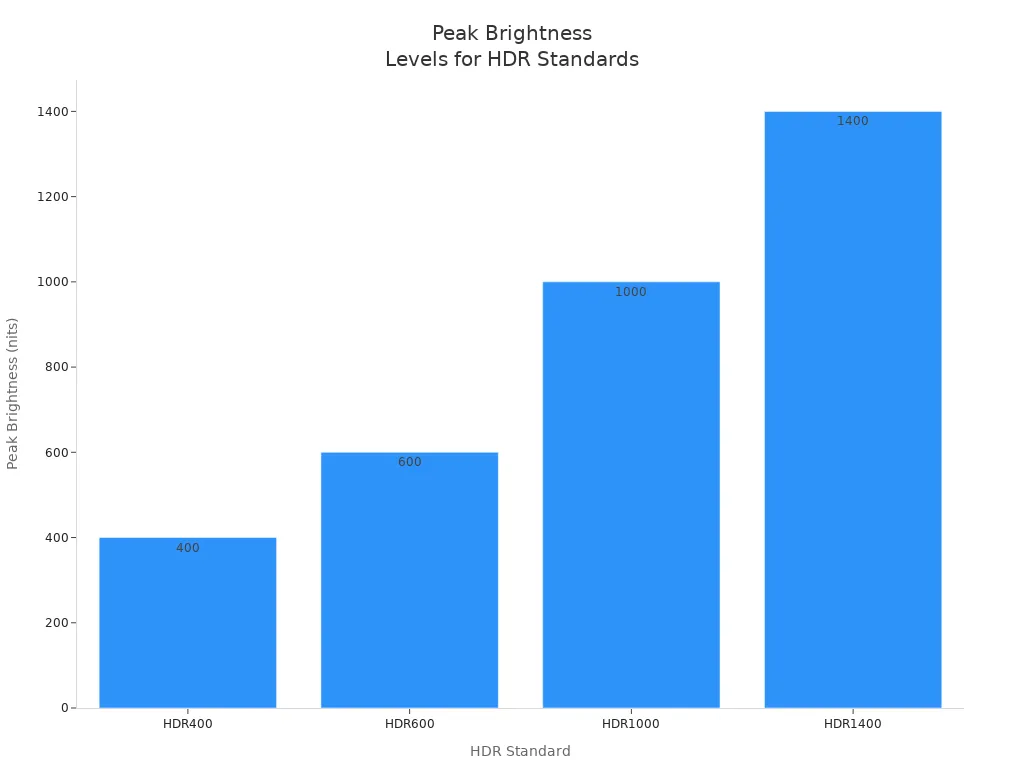
You should choose a monitor brightness of at least 1000 nits for true HDR. High brightness enhances color accuracy and detail in games. You see brighter highlights and deeper shadows. For tv display gaming setups, a high nit rating improves your experience. Always select a monitor with a recommended nits brightness for HDR content.
Outdoor and Professional Needs
Outdoor tv and professional displays require much higher screen brightness. You need a monitor brightness that compensates for sunlight and glare. Outdoor tv installations demand a brightness rating between 2000 and 4000 nits. Outdoor LED displays often reach 4000 to 10,000 nits for optimal visibility. You must select a high brightness monitor for outdoor tv advertising or public information screens.
Application | Recommended Brightness (nits) | Notes |
|---|---|---|
Outdoor Advertising (Billboards) | Maintains legibility under direct sunlight | |
General Outdoor Installations | 3,500 - 10,000 | Compensates for indirect/filtered sunlight |
Outdoor Displays | 2,000 - 4,000 | Subject to full sun exposure |
Outdoor LED Displays | 4,000 - 10,000 | Recommended for optimal visibility |
You should always check the recommended nits brightness for outdoor tv applications. High brightness ensures your content remains visible in any weather. Outdoor tv screens with a high nit rating deliver clear images even under direct sunlight.
Note: Outdoor tv displays need the highest screen brightness to overcome glare and maintain legibility.
Factors Affecting Peak Brightness
Display Technology
You see major differences in peak brightness depending on the display technology inside your TV or monitor. Each type uses unique materials and engineering, which impacts how bright the screen can get and how well it maintains color accuracy. For example, Mini-LED and MicroLED panels reach higher peak brightness levels than traditional OLED or LCD screens. Mini-LED displays use thousands of tiny LEDs for local dimming, which boosts highlights without sacrificing contrast. QLED panels deliver excellent brightness and color accuracy, making them a top choice for HDR content.
Here’s a comparison of common display technologies:
Display Technology | Peak Brightness (nits) | Notes |
|---|---|---|
Mini-LED | 1000–3000+ | Higher peak brightness due to local dimming zones |
QLED | 1500-2000 | Best brightness with excellent color accuracy |
OLED | 1000-1500 | Improved but lower than QLED |
QD-OLED | Higher than standard OLED | Enhanced peak brightness |
MicroLED | 2000-5000+ | Combines strengths of LCD and OLED |
Manufacturers face several challenges when increasing peak brightness. High brightness can shorten panel lifespan and increase power consumption. For example, WOLED panels often max out at 500-800 nits because higher levels may cause pixel degradation. LCDs sometimes lose color accuracy at extreme brightness, while OLEDs can show color shifting. You should consider these factors when choosing a display for your needs.
Note: Higher display brightness often means more power use and heat, which can affect durability and energy costs.
Ambient Lighting
Ambient lighting in your environment plays a key role in determining the ideal peak brightness for your display. You need more brightness in a sunlit office than in a dark home theater. If you use your monitor in a dim room, 80 nits usually provide enough clarity. In a bright office, you may need 250 nits or more to keep images sharp and readable.
Ambient Lighting Condition | Surround Brightness | |
|---|---|---|
Dark Room | 80 nits | 16 lx |
Bright Office | 250 nits | >300 lx |
Digital Cinema | 0% darkness | N/A |
You should match your display’s brightness to your room’s lighting. This approach helps you avoid eye strain and ensures you see accurate colors. If you set the brightness too high in a dark room, you may lose detail in shadows and highlights. In bright spaces, low brightness can make the screen look washed out.
Tip: Adjust your monitor’s brightness as your environment changes throughout the day for the best viewing comfort.
Choosing the Right Monitor Brightness
Assessing Your Needs
You need to consider several factors before selecting the right monitor brightness. Your eye sensitivity varies from others, so what feels comfortable for you may not suit someone else. The ambient light in your room changes how bright your screen appears. Surface color and reflectivity also influence your perception of brightness. Psychological and neurological states can affect how you experience luminance.
Brightness affects screen visibility in different lighting environments.
Contrast impacts readability and eye comfort.
Testing should include both indoor and outdoor conditions.
Use light meters to measure peak brightness in nits.
Evaluate how well deep blacks are maintained in dark scenes.
Brightness uniformity is crucial. Even minor inconsistencies can obscure fine details, especially for tasks that require precision, such as medical diagnosis. Consistent luminance across the screen ensures every part of an image remains equally clear.
Comparing Specs and Nits
You should compare monitor specifications and nits ratings based on your intended usage. The table below helps you match recommended nits ranges to common monitor types and environments:
Monitor Type | Recommended Nits Range | Purpose/Usage Description |
|---|---|---|
Outdoor Digital Signage | 1000–3000+ nits | Needed for visibility in direct sunlight or brightly lit environments. |
Smartphones & Tablets | 500–2000 nits | Allows easy reading and visibility under outdoor lighting conditions. |
TVs & Cinematic Screens | 600–1500 nits | Great for HDR movies and immersive viewing in darker rooms. |
Gaming & Design Monitors | 400–1000 nits | Balances vivid visuals with accurate color and detail. |
General Office Use | 300–500 nits | Sufficient brightness for typical indoor applications. |
High Ambient Light Use | 600–700 nits | Maintains visibility in brighter indoor lighting conditions. |
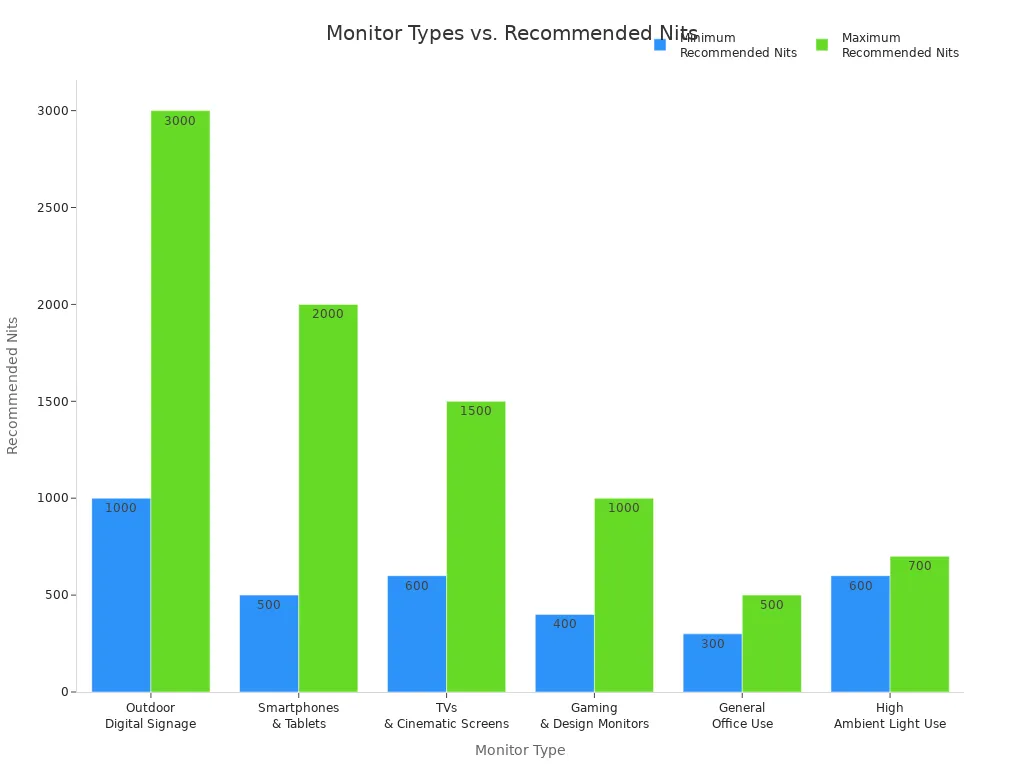
Adjust brightness settings based on your environment. Consider the display technology, such as LCD or OLED, since it affects perceived brightness. Look for anti-glare coatings to improve visibility in bright conditions.
Buying Tips
You can avoid common mistakes by following these practical tips:
Opt for LED lighting for energy efficiency and low heat emission.
Match color temperature to the nature of displayed items for enhanced appearance.
Position lights strategically to prevent glare and shadows.
Use adjustable fixtures for flexibility.
Choose LED lights to minimize heat and UV exposure, ensuring proper ventilation.
Warm white light (2700K–3000K) creates a cozy atmosphere, ideal for antiques. Neutral white (3500K–4100K) offers a balanced look for various items. Cool white (5000K and above) mimics daylight and suits modern objects.
Traditional lighting sources, such as halogen or incandescent bulbs, emit significant heat and UV rays. These can cause fading and deterioration of sensitive display items. LED lights emit minimal heat and virtually no UV radiation, making them safer for delicate materials.
Tip: Always test your monitor in your actual environment before finalizing your purchase. This step ensures you get optimal brightness and comfort for your needs.
You gain a better viewing experience when you understand peak brightness and nits. Different brightness levels suit specific environments.
200–400 nits work best indoors.
400–700 nits fit outdoor covered areas.
Above 1,000 nits handle direct sunlight.
Higher brightness improves visibility and color accuracy. You make smarter purchasing decisions by matching display brightness to your environment and content needs.
To choose the right display, follow these steps:
Refine your selection based on performance and environment.
Match display features to your content and audience.
Test creative variations and optimize for mobile devices.
Tip: Always check nits ratings and test displays in your actual space for the best results.
FAQ
What does "nits" mean in TV and monitor specs?
You see "nits" as a unit measuring screen brightness. One nit equals one candela per square meter. Higher nits mean a brighter display, which improves visibility in well-lit spaces.
How much peak brightness do you need for HDR?
You need at least 1,000 nits for true HDR performance. Displays with higher peak brightness show more vivid highlights and deeper contrast.
Tip: Look for HDR1000 or higher certification for the best results.
Does higher brightness always mean better picture quality?
You gain better visibility with higher brightness, but color accuracy and contrast also matter. Some displays lose color fidelity at extreme brightness.
Check both brightness and color specs before buying.
Can you adjust monitor brightness for different environments?
You can adjust brightness settings to match your room’s lighting. Lower brightness works best in dark rooms. Increase brightness for sunlit spaces.
Note: Use adaptive brightness features for automatic adjustments.
Are OLED displays good for bright rooms?
OLED displays offer excellent color and contrast, but peak brightness is lower than QLED or Mini-LED. You may notice glare or washed-out images in very bright rooms.
Display Type | Bright Room Performance |
|---|---|
OLED | Moderate |
QLED/Mini-LED | Excellent |
See Also
Simplifying Your Choices: LED Or LCD Monitors Explained
Key Features To Consider When Choosing An OLED TV
Transforming Screen Experience: The Impact Of BNL Technology
Essential Features To Look For In Gaming Displays
2025 LCD Screens: Innovations Enhancing Clarity And Efficiency