Portable monitor guide for work made easy
You want the best portable monitor for work in 2026. Start by focusing on the features that matter most for professionals. Look for the right screen size, high brightness, strong resolution, easy portability, and reliable connectivity. Check for extras that match your daily tasks.
Professionals rate these criteria as top priorities:
Criteria | Description |
|---|---|
Connectivity Options | Works with USB-C, HDMI, or DisplayPort for device compatibility |
Battery Life | Supports mobility without frequent charging |
Screen Resolution | Delivers clear images, ideal for reading and editing |
Panel Type | Ensures accurate colors and wide viewing angles |
Brightness | Provides visibility in different lighting |
Ergonomics | Reduces strain during long work hours |
Use this portable monitor guide for work to match your needs with the best features and make a confident choice.
Key Takeaways
Identify your work needs before choosing a portable monitor. Consider screen size, resolution, and specific tasks to find the best fit.
Prioritize portability and battery life if you travel often. Look for lightweight models that are easy to carry and set up quickly.
Ensure device compatibility by checking connection options like USB-C and HDMI. This helps avoid issues when connecting to laptops or tablets.
Select a monitor with high brightness and good display quality. Aim for at least 400 nits and an IPS panel for clear visuals in various lighting.
Review warranty and support options before purchasing. Reliable coverage protects your investment and ensures help if issues arise.
Portable monitor guide for work: defining your needs
Work type and usage
You need to start by identifying your daily tasks and work environment. If you commute to an office and require a dual-screen setup, prioritize a portable monitor for productivity with a 15.6-inch screen and full HD resolution. Coding and data analysis demand crisp visuals and wide viewing angles, so look for IPS panels and high resolution. Designers and media creators benefit from accurate color reproduction and larger screens. Business travelers and professionals who present in meetings need lightweight monitors with reliable connectivity. Light entertainment and office work call for balanced features and affordability, making the best budget portable monitor a smart choice. The portable monitor guide for work helps you match these scenarios to the features that matter most.
Portability and travel
You must consider how often you move between locations. If you travel frequently, weight and build quality become essential. Choose a monitor that fits easily in your bag and withstands daily handling. Battery life is crucial for remote work, especially when outlets are scarce. Professionals who work from multiple sites need a device that sets up quickly and packs away without hassle. For business travel and presentations, slim designs and integrated stands improve usability. The portable monitor guide for work ensures you select a model that supports your mobility and work style.
Device compatibility
Your portable monitor must connect seamlessly to your devices. Most professionals use laptops, tablets, or smartphones for work. The table below shows common connection methods:
Device Type | Connection Method |
|---|---|
Laptops | USB-C, HDMI |
Tablets | USB-C, micro HDMI |
Smartphones | USB-C (DisplayPort), Lightning to HDMI |
Gaming Consoles | HDMI |
Check your device ports before buying. USB-C offers fast data transfer and power delivery, making it ideal for work. HDMI provides universal compatibility. If you use multiple devices, select a monitor with versatile ports. The best portable monitor adapts to your workflow and supports productivity across platforms.
Key features of the best portable monitor
Screen size and resolution
You need to select the right screen size and resolution for your work. Portable monitors typically range from 13 to 17 inches. A 15.6-inch screen offers the best balance between workspace and portability. For multitasking, this size gives you enough room to view documents side by side without feeling cramped. If you handle creative tasks, such as graphic design or video editing, larger screens and higher resolutions provide better color accuracy and detail.
1080p resolution is sufficient for productivity tasks like spreadsheets, coding, and document editing.
Higher resolutions, such as 4K, are ideal for creative work and reduce eye strain by offering clarity similar to printed materials.
For general productivity, a 14–16 inch screen with 1080p resolution meets most needs.
Tip: Choose a portable monitor for productivity with a 15.6-inch, 1080p display for everyday office tasks. Opt for 4K if you require precise visuals.
Brightness and display quality
Brightness affects how well you see your screen in different environments. You should look for monitors with 400–600 nits of brightness. This range ensures comfortable viewing indoors and in moderately bright outdoor conditions. Display quality depends on panel type. IPS panels deliver accurate colors and wide viewing angles, which are essential for design and media work.
High brightness improves visibility during presentations and remote work.
Color accuracy matters for creative professionals and anyone who needs reliable visuals.
Note: If you often work in bright spaces or travel, prioritize a monitor with at least 400 nits and an IPS panel.
Weight and build
Weight and build quality determine how easily you can carry your monitor. Lightweight models suit frequent travelers and remote workers. Durable construction protects your device from daily wear and tear. The table below shows typical weights for popular portable monitors:
Monitor Model | Weight |
|---|---|
ViewSonic | ~1.8 lb |
Lenovo ThinkVision M14 | ~1.31 lb |
ViewSonic VG1655 | ~1.8 lb |
You should select a monitor under 2 pounds for easy transport. Slim designs and integrated stands make setup quick and hassle-free.
Ports and connectivity
Connectivity options impact how you use your monitor with different devices. USB-C is the primary connection type in 2026. It supports power, video, and audio through a single cable, reducing clutter. HDMI remains widely compatible with laptops, tablets, and gaming consoles. DisplayPort and Thunderbolt offer higher bandwidth for demanding applications. Wireless connectivity is emerging but may introduce latency.
USB-C supports multiple functions and is flexible for modern devices.
HDMI ensures compatibility with older devices and multimedia setups.
DisplayPort and Thunderbolt are best for high-end workstations.
The table below compares USB-C and HDMI:
Feature | USB-C | HDMI |
|---|---|---|
Compatibility | Varies by device capabilities | Widely compatible with many devices |
Power Delivery | Yes, can transmit power along with video/audio | No, does not support power delivery |
Use Case | Ideal for modern devices, portable setups | Reliable for fixed setups, older devices |
Cable Requirement | Single cable for power, video, and data | Separate cables may be needed for power |
Video/Audio Interface | Multi-purpose connector | Dedicated video/audio interface |
Tip: For maximum flexibility, choose a monitor with USB-C and HDMI ports.
Battery and power options
Power options affect how long you can use your monitor away from outlets. Many portable monitors draw power from connected devices via USB-C. Some models include built-in batteries, providing several hours of use. Battery-powered monitors are essential for locations without reliable power. Dual-screen setups enhance productivity and organization.
Portable monitors use between 5W and 15W, much less than traditional monitors.
Using USB-C can reduce your laptop battery life by 30–50%.
Pass-through charging helps mitigate battery drain.
Modern monitors like the Cevaton T2 PRO can run on a single USB-C cable. Connecting to a wall outlet boosts brightness and preserves your laptop battery. For Windows laptops, USB-C with DisplayPort Alt Mode and Power Delivery pass-through is optimal.
Feature | Details |
|---|---|
Power Source | USB-C or built-in battery |
Battery Life | Several hours, ideal for travel and remote work |
Productivity Enhancement | Dual screens improve multitasking and organization |
Touchscreen and extras
Touchscreen capability adds versatility to your workflow. You can interact directly with documents, presentations, and creative projects. Built-in webcams and speakers support video calls and presentations. Pen support is valuable for designers and note-takers.
Touchscreens streamline navigation and editing.
Integrated webcams and speakers make remote meetings easier.
Pen support enhances creative tasks.
Note: If you present often or collaborate remotely, consider monitors with webcams and speakers.
Price and warranty
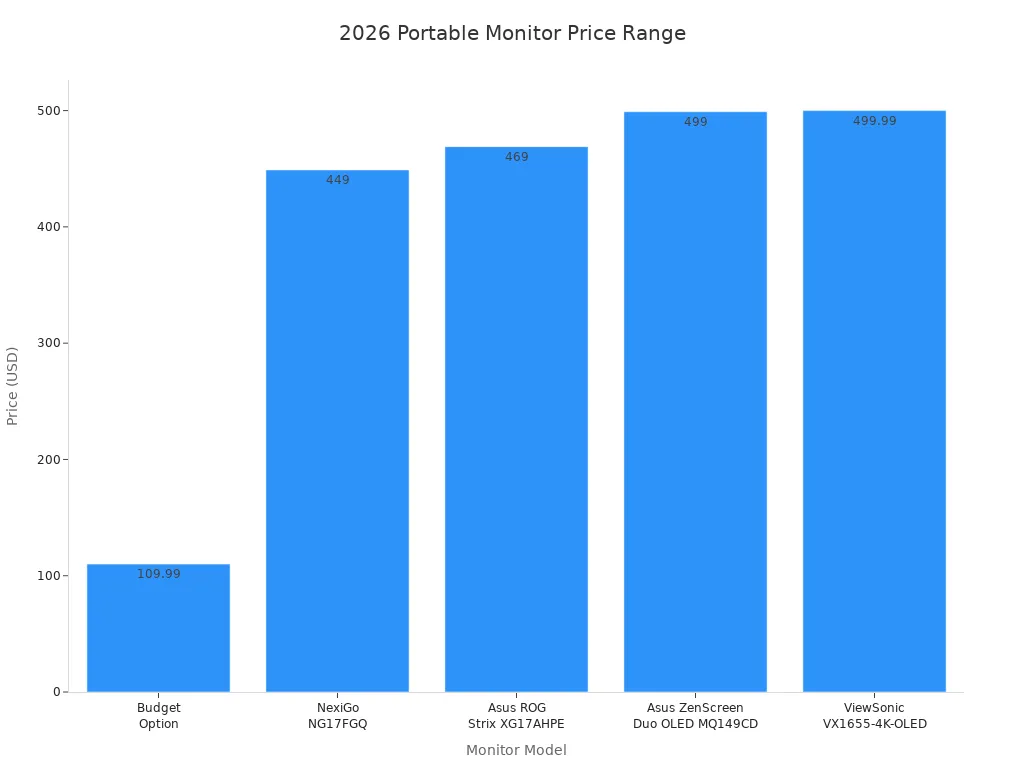
Price reflects the features and build quality of your monitor. High-quality models range from $449 to $499 and offer advanced features like OLED panels, high resolutions, and strong battery life. Budget options start at $109.99 and suit general office tasks. Warranty coverage protects your investment and ensures support if issues arise.
Model | Price | Key Features |
|---|---|---|
Asus ZenScreen Duo OLED MQ149CD | $499 | Dual 14-inch OLED displays, 1920×1200 resolution, 400 nits brightness, color-sensitive tasks |
ViewSonic VX1655-4K-OLED | $499.99 | 15.6-inch OLED panel, 3840 x 2160p (4K) resolution, 400 nits brightness, thin and lightweight |
NexiGo NG17FGQ | $449 | 17.3-inch IPS, 300Hz refresh rate, 1080p resolution, 300 nits brightness, gaming focus |
Asus ROG Strix XG17AHPE | $469 | 17.3-inch IPS, 240Hz refresh rate, Full HD 1080p, 7800mAh battery for portability |
Best budget portable monitor | $109.99 | Basic features, lower resolution, suitable for general use |
Tip: Review warranty terms before purchase. Choose a model that matches your work needs and offers reliable support.
You can use this portable monitor guide for work to compare features and select the best portable monitor for your daily tasks. The right features help you maximize productivity, whether you need a portable monitor for productivity, creative work, or remote meetings.
Best portable monitors 2026: comparison and picks
Quick comparison overview
You want a portable monitor guide for work that makes it easy to compare the best portable monitors 2026. The table below summarizes top models for different work scenarios, so you can quickly see which features matter most for your needs.
Model | Size | Resolution | Panel Type | Refresh Rate | Weight | Battery Life | Best For | Special Features |
|---|---|---|---|---|---|---|---|---|
Duex Lite | 12.5" | 1920×1080 | IPS | 60Hz | 1.3 lbs | N/A | Commuting, Students | Lightweight, compact |
ASUS XG17AHPE | 17.3" | 1080p | IPS | 48-240Hz | N/A | 3.5 hours | Coding, Gaming | FreeSync, G-SYNC Compatible |
Glance Pro | 15.6" | 1920×1080 | IPS | 60Hz | N/A | N/A | Design, Creative Work | Vibrant color, pen support |
Innocn 15A1F | 15.6" | 1920×1080 | OLED | N/A | 1.6 lbs | N/A | Meetings, Media | Infinite contrast, 100% DCI-P3 |
KYY Portable Monitor | 15.6" | 1080p | IPS | 60Hz | 1.7 lbs | N/A | General Productivity | Affordable, essential features |
Arzopa Z1FC | 15.6" | 1080p | IPS | 144Hz | N/A | N/A | Entertainment, Gaming | High refresh rate |
You can use this overview to match your work style with the right portable monitor for productivity, design, or travel.
Pros and cons by work scenario
You need to know the strengths and weaknesses of each model before you buy. The following table highlights what you gain and what you might sacrifice in each scenario.
Scenario | Advantages | Disadvantages |
|---|---|---|
Commuting | Lightweight, compact, easy to carry | Smaller screen, limited color accuracy |
Coding | Dual screens boost efficiency, high refresh rate | May rely on laptop GPU, battery drain |
Design | Vibrant color, pen support, large workspace | Higher price, less portable than smaller models |
Meetings | Built-in speakers, webcam options, OLED panels | Susceptible to damage during travel |
Entertainment | High refresh rate, good for gaming | Lower image quality than desktop monitors |
General Work | Affordable, essential features, easy setup | Basic color and refresh rate, not for advanced tasks |
User reviews show that the KYY Portable Monitor stands out as the best budget portable monitor for general work. You get value and portability, but you may notice weaker color accuracy and refresh rates compared to premium models. For design, the Glance Pro offers superior visuals, while the ASUS XG17AHPE excels in coding and gaming with its high refresh rate. The Duex Lite remains a top pick for commuters who need a lightweight solution.
Tip: Choose the best portable monitor that matches your daily tasks and work environment. Focus on features that support your workflow, whether you need a second screen for meetings or a high-refresh-rate display for coding.
If you follow this portable monitor guide for work, you will find the best portable monitors 2026 for your unique needs.
Buying tips for the best portable monitor
Where to buy and what to check
You need to choose reputable retailers when shopping for the best portable monitor. Trusted stores offer genuine products, clear warranty terms, and reliable customer support. The table below lists popular retailers and their featured monitors for work:
Retailer | Product Description | Link |
|---|---|---|
Best Buy | Acer PM161W - 16.0" WUXGA 60Hz FreeSync Compatible IPS Portable Monitor | |
Best Buy | ViewSonic VG1655 - 15.6" USB-C Portable 1080p Monitor | |
Micro Center | Arzopa S1 - 15.6" FHD (1920 x 1080) Portable Monitor | |
Walmart | Verbatim 14" Portable Monitor - Full HD 1080p | |
Verdi | ViewSonic VG1656N - 16" 1200p IPS Wireless Portable Monitor |
Before buying, check device compatibility. Make sure your laptop, tablet, or phone supports the monitor’s ports and features. Avoid common pitfalls by confirming operating system compatibility, especially for touchscreens. Check if your device needs drivers for touch functionality. Review the ports on your devices to avoid buying extra adapters. Confirm hardware and software support for external touch displays.
Tip: Avoid monitors with unnecessary features or low-quality screens. Choose a budget portable monitor only if it meets your work requirements.
Reading reviews and expert advice
You should read user reviews and expert opinions before making a decision. Reviews highlight real-world performance and help you avoid surprises. Experts note that using multiple monitors can boost productivity by 42%. You gain more screen space for applications, reduce window-switching, and make laptop work less cramped.
“We found that users of multiple monitors have an average expected productivity increase of 42%.” — Dr. Jon Peddie, Jon Peddie Research
More screen space for Teams, documents, and spreadsheets.
Reduces the need for constant window-switching.
Makes working with a laptop feel less cramped.
Expert reviews often mention these pros and cons:
Pros | Cons |
|---|---|
Boosts productivity | Design limitations |
Increases flexibility | Portability issues |
Enhances usability |
Warranty and support tips
You must review warranty and support options before purchasing. Look for touch technology coverage, which protects against controller failures and calibration issues. Display quality warranties cover pixel defects and brightness uniformity. Extended warranty programs offer protection for up to five years. Service level agreements define response times and minimize downtime. Technical support services help with installation and troubleshooting.
Touch technology coverage for sensor and calibration issues.
Display quality warranties for pixel defects and brightness.
Extended warranty programs for long-term protection.
Service level agreements for fast support.
Technical support for setup and optimization.
Note: Reliable warranty and support ensure your monitor stays functional for work. Always check the terms before buying.
You can select the best portable monitor for work by following a few key steps.
Identify your daily tasks and preferred screen size.
Choose IPS panels for color accuracy and comfortable viewing angles.
Look for adjustable stands and blue light filters to support long hours.
Ensure USB-C hubs with power delivery simplify laptop docking.
Match your needs with the right features and models. Take action using these practical tips to make a confident, informed purchase.
FAQ
What screen size and resolution should you choose for daily commuting and office work?
You should select a 14–15.6 inch monitor with 2K or 2.5K resolution. This size fits easily in your bag and provides clear, comfortable text for long hours. Lightweight models under 750g prevent shoulder strain.
Which features matter most for coding and data analysis?
You need a 15.6–16.1 inch screen with 2.5K resolution and 100% sRGB color. Look for low blue light certification and full-function USB-C plus HDMI ports. These features help you view multiple lines of code and protect your eyes.
How can you avoid common mistakes when buying a portable monitor for design work?
Avoid low color accuracy screens.
Choose IPS or QLED panels with 99% DCI-P3 or 100% sRGB. Select 2.5K or 4K resolution and brightness above 400 nits. Reliable brands ensure consistent color for editing.
What should you check for business travel and presentations?
You must confirm device compatibility. Select a 15.6 inch monitor with universal ports (USB-C, HDMI). Durable metal casing and integrated stands improve reliability. One-touch signal switching simplifies setup for meetings.
Can you use a portable monitor for both work and entertainment?
Yes. Choose a model with native 120Hz or 144Hz refresh rate, high color gamut, and built-in speakers. A 2K screen delivers clear visuals for office tasks and streaming. Avoid gaming monitors if you only need basic office features.
See Also
Essential Tips for Selecting the Perfect Monitor
Best 10 Curved OLED Monitors for Creative Experts
Three Affordable Gaming Monitors to Consider in 2025
Comprehensive Overview of Smart Board Features for Businesses