Essential Tips for Choosing a Commercial TV for Your Business

Buying the right TV for your business shapes how customers perceive your brand and interact with your space. When you select a commercial TV that fits your needs, you unlock new possibilities for engagement and efficiency. Studies show that TV displays boost brand awareness by 23% and can drive website traffic up by 12% in the first month, with continued growth over time.
Brand recognition increases your competitive edge and lowers customer acquisition costs.
Enhanced visibility leads to more efficient operations and better customer experiences.
You should always consider both your immediate goals and the long-term value a quality display brings to your business.
Key Takeaways
Define your business needs before purchasing a commercial TV. Consider how the display will enhance customer engagement and support your goals.
Choose a commercial TV with high durability and performance. These displays are designed for long hours of use and prevent issues like screen burn.
Evaluate the location for your TV installation. High-traffic areas maximize visibility and ensure your content reaches the right audience.
Invest in 4K resolution for future-proofing. This upgrade keeps your business aligned with evolving visual standards and reduces the need for frequent updates.
Work with reputable providers for warranties and support. Reliable partners help maintain your displays and minimize downtime.
Assess Your Business TV Needs
Define Application and Usage
Start by clarifying how you plan to use your commercial tv. The right application depends on your business setting and the goals you want to achieve. Review the table below to see common applications for professional tv displays in different environments:
Business Setting | Applications |
|---|---|
Luxury Hospitality | Guest check-in automation, personalized welcome messaging, in-bathroom entertainment, concierge service integration |
Beauty and Wellness | Virtual makeup consultations, service menu displays, client history access, appointment scheduling |
Premium Corporate Offices | Executive visitor management, company achievement showcases, meeting room booking, brand messaging displays |
Exclusive Residential Developments | Building amenity information, community event announcements, visitor notification systems, property showcases |
You should match the display’s function to your business objectives. For example, a lobby display can enhance guest experience, while a meeting room screen can streamline presentations.
Consider Environment and Audience
The best location for your setup depends on lighting, foot traffic, and the viewing area. Each business environment, such as retail stores or restaurants, requires unique content and legal compliance. You must also consider:
The type of audience and their dwell time in the viewing area.
The physical location, which can influence streaming or satellite options.
The size and picture quality needed for clear viewing in high-traffic zones.
Professional tv displays must meet legal requirements for public viewing and advertising. Always check programming licenses and installation needs.
Evaluate ROI and Engagement
You should measure how your displays impact business goals. Track key performance indicators like store traffic, website visits, and sales. Use metrics such as impressions and click-through rates for connected tv advertising. Regularly review campaign data to optimize your strategy and maximize engagement. Pair visit lift with downstream signals like appointments to understand the true value of your investment.
Key Features of Commercial TVs
Panel Performance and Durability
You need to prioritize panel performance and durability when selecting professional tv displays for your business. Commercial tvs are engineered for demanding environments. They operate continuously for long periods without suffering from image retention, which often affects consumer models. You can rely on these displays to deliver consistent picture quality, even in high-traffic areas.
The following table highlights the main differences between commercial and consumer TVs:
Feature | Commercial TVs | Consumer TVs |
|---|---|---|
Durability | Built for 16 hours/day, withstands heat, impact, and dust | Not designed for extensive use, easily damaged |
Screen Burn | Designed to prevent screen burn | Prone to screen burn with static images |
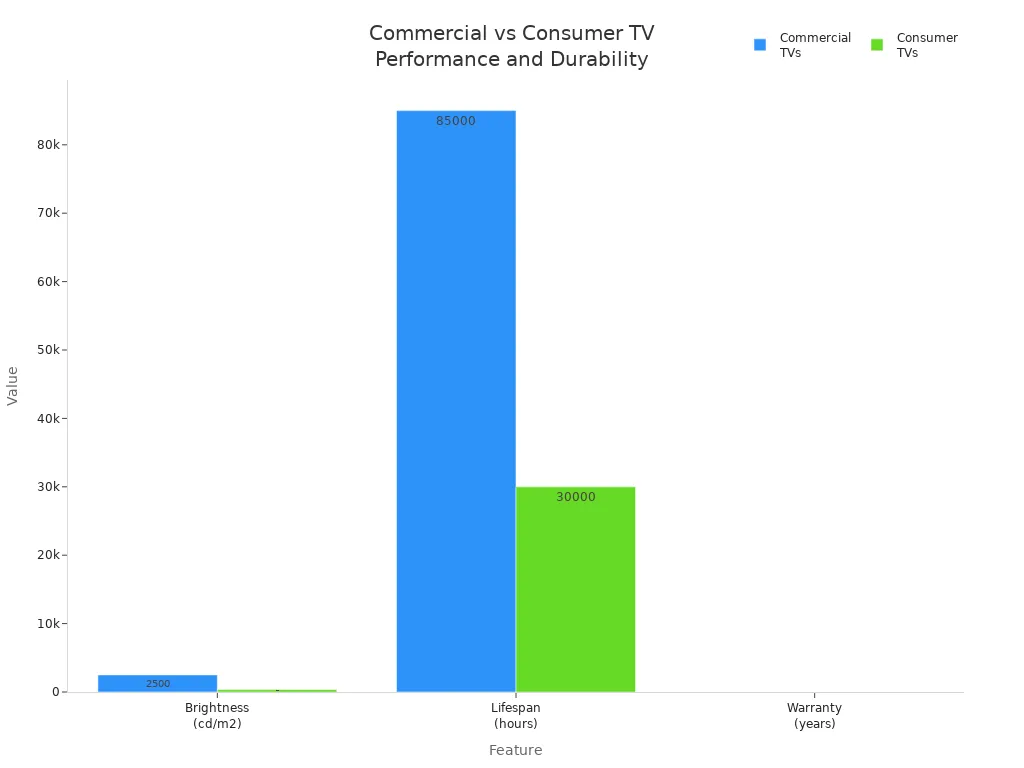
Brightness | Up to 2,500+ cd/m2 | Typically tops out at 350 cd/m2 |
Lifespan | 70,000 to 100,000 hours | Around 30,000 hours |
Warranty | Usually three years | Typically one year, voided by commercial use |
You can see that commercial tvs offer higher brightness, longer lifespan, and better protection against screen burn. These features make them ideal for professional tv displays in retail, hospitality, and public spaces. The chart below visually compares brightness, lifespan, and warranty:
You should also consider the size and resolution of your display. Ultra high definition and high definition options ensure sharp visuals for any viewing distance. This is especially important for advertising and information displays where clarity matters most.
Connectivity and Control Options
You must evaluate connectivity and control options to maximize the value of your professional tv displays. Modern commercial tvs support a wide range of integration features. These include network and communications infrastructure, WiFi, and distributed antenna systems. You can connect your displays to dynamic digital signage, wayfinding solutions, and analytics platforms.
Tip: Choose displays that support centralized management and administration. This allows you to monitor and control multiple screens from a single location.
Remote management and content scheduling streamline your operations. You can update content in real time, reducing manual interventions. Pre-planned scheduling ensures your messages reach the audience at the right moment. Centralized control also enables immediate troubleshooting and software updates, minimizing downtime and technical support costs. Energy management features help you lower operational expenses.
Real-time monitoring lets you track display performance and identify potential issues early. This proactive approach prevents critical failures and ensures your displays always deliver the best customer experience.
Public Information and Content Management
You should look for features that enhance public information delivery and content management. Commercial tvs often include ad-free boot-up, which creates a seamless and professional appearance. Wall-mount compatibility ensures your displays fit any environment, from lobbies to conference rooms.
Content management systems allow you to schedule and organize messages efficiently. You can tailor content for different times of day or audience segments. This flexibility supports both branding and advertising strategies. High picture quality and large tv size options help you capture attention and communicate clearly, even in busy or well-lit spaces.
Professional tv displays with robust content management tools give you the power to adapt quickly to changing business needs. You can keep your information up to date and relevant, driving engagement and supporting your operational goals.
Placement and Installation for Business
Location and Visibility
You need to select the right location for your commercial TV to maximize visibility and accessibility. Strategic placement ensures your display captures attention and delivers messages effectively. When you integrate OTT and CTV with traditional TV, you enhance targeting capabilities and reach specific audiences. This combination improves engagement and provides measurable performance data, which drives business outcomes.
Consider these factors when choosing a location:
High-traffic areas increase exposure and brand recall.
Well-lit spaces require displays with high brightness to maintain clarity.
Viewing angles should allow customers to see content without obstruction.
TV enhances brand recall significantly. Pairing TV with search, social media, or podcasts multiplies recall rates. Your display not only captures attention but also creates lasting memories that elevate customer engagement. The credibility established by TV transforms awareness into trust, leading to improved results for your business.
Tip: Place your commercial TV where customers naturally gather or pause, such as waiting areas, lobbies, or near entrances. This maximizes dwell time and ensures your content reaches the right audience.
Mounting and Security
You must choose mounting solutions that provide both a professional appearance and robust security. Securely mounting TVs with appropriate hardware prevents accidents and protects your investment. Use stud-finding techniques to anchor mounts into the wall for stability. Anti-theft measures, such as lockable mounts, protect against theft in public spaces.
Best For | Key Features | Use Case | |
|---|---|---|---|
Fixed Mounts | Budget-conscious buyers | Sleek, stationary display solution | Residential bedrooms, hotel rooms |
Tilt Mounts | Reducing glare in bright environments | Adjustable tilt angle, compact design | Classrooms, public waiting areas |
Full-Motion/Articulating | Dynamic environments requiring flexibility | Swivel, extend, and tilt functionalities at a budget-friendly cost | Retail displays, hybrid workspaces |
High-traffic areas are more vulnerable to theft or tampering. Secure, lockable enclosures deter unauthorized access and tampering, ensuring the safety of your equipment.
Note: Always select mounting options rated for the size and weight of your display. This guarantees stability and maintains a polished look in your business environment.
Buying the Right TV: Budget and Future-Proofing
Balancing Cost and Features
You need to evaluate cost versus value when planning your television purchase. Commercial tv displays offer advanced features that support your business goals, but you must balance these benefits with your budget. Consider the size, resolution, and picture quality that best fit your viewing area. Investing in professional tv displays with high definition or ultra high definition ensures your content stands out, especially for advertising and information. You should compare warranty terms, expected lifespan, and support options to maximize long-term ROI.
Tip: Prioritize displays that deliver consistent performance and reliability. This reduces unexpected expenses and supports your business growth.
4K Resolution and Upgrade Cycles
Choosing a 4k television positions your business as an industry leader. 4K resolution is more than a technical upgrade; it signals your commitment to meeting evolving visual standards. Displays with 4K provide a flexible canvas for various industries, allowing you to adapt to future content demands without frequent infrastructure upgrades. Investing in 4K media players extends the longevity of your digital signage, minimizing hardware updates and operational costs. Ultra high definition displays align with the industry's shift toward higher quality content, ensuring you avoid premature upgrade cycles and future-proof your investment.
Resolution | Adaptability | Upgrade Frequency | Brand Authority |
|---|---|---|---|
1080p | Limited | High | Moderate |
4K | Flexible | Low | High |
Energy Efficiency and Maintenance
Energy-efficient displays can significantly reduce operational costs. For example, hotel TVs with energy-saving features lower electricity consumption by up to 40% compared to standard models. A 200-room hotel can save $20,000–$25,000 annually, leading to over $100,000 in savings over five years. Traditional displays consume between 80–120 watts per hour, which adds up quickly across many rooms.
You should also consider maintenance requirements. Over time, displays may experience recurring glitches, slow user interfaces, dropped connections, limited app support, outdated inputs, degraded picture or sound quality, rising repair costs, and poor compatibility with newer gear. Selecting professional tv displays with robust support and modern standards helps you avoid these issues and maintain optimal viewing experiences.
Note: Regularly review your displays for performance and compatibility. Proactive maintenance ensures your business stays ahead and delivers the best customer experience.
Choosing Providers and Timing Your Purchase
Warranty and Support
You should always work with reputable providers when purchasing commercial TVs for your business. Trusted suppliers offer comprehensive warranties and responsive after-sales support. These services protect your investment and minimize downtime if issues arise. Look for providers who offer on-site service, fast replacement policies, and dedicated technical support teams. Reliable partners help you resolve problems quickly, so your displays continue to deliver value for your advertising and communication needs.
Tip: Ask providers about their warranty coverage details, including response times and what is included. A strong warranty can save you significant costs over the lifespan of your display.
You can also benefit from providers who offer installation services and ongoing maintenance plans. These extras ensure your displays remain in optimal condition and reduce the risk of unexpected expenses.
When to Buy for Best Value
Timing your purchase can make a big difference in cost and access to the latest technology. You can find the best deals and new models by shopping during key periods throughout the year:
Black Friday and Cyber Monday: Retailers offer deep discounts from late October to mid-December.
NFL Playoff Season: Mid-January to early February brings significant savings, especially on large-screen TVs.
Spring: March and April often feature promotions, though discounts may be smaller than in winter.
Shopping in person allows you to compare picture quality, test features, and discuss options with knowledgeable staff. You can also see how different models perform in real-world lighting conditions. By planning your purchase around these peak times, you maximize value and ensure your business stays ahead with the latest display technology.
Note: New model releases often coincide with major trade shows or seasonal promotions. Staying informed about industry trends helps you make the most strategic buying decisions.
To choose the right commercial TV for your business, follow these steps:
Shop in person to assess picture quality.
Learn key TV terms.
Select 4K for future-proofing.
Measure your space for optimal placement.
Work with your provider for the best content.
Time your purchase for savings.
Align your TV choice with business goals using this table:
Metric | Description |
|---|---|
Sales goals | Ensure advertising spend drives revenue growth. |
Customer engagement | Link actions like website visits to TV campaigns. |
Lifetime value (LTV) | Attract high-value customers for long-term growth. |
Launching without clear goals
Relying only on short-term results
Setting budgets too low for measurable impact
Use these tips to make a confident decision. Consult experts if you need more guidance.
FAQ
What makes commercial TV displays different from consumer models?
You get higher brightness, longer lifespan, and advanced durability with commercial TV displays. These displays support continuous use in your business. They also prevent screen burn and offer better warranties than consumer models.
How do I choose the right size for my displays?
Measure your space and viewing distance. Larger displays work best in open areas or high-traffic zones. Smaller displays fit meeting rooms or focused advertising spots. Always match the display size to your business needs.
Can I use commercial TV displays for advertising and information?
Yes. You can schedule content, run dynamic advertising, and share real-time information. These displays support content management systems, making it easy to update advertising messages and keep your audience engaged.
How do I maintain my displays for long-term performance?
Clean your displays regularly and check for software updates. Use energy-saving settings to extend lifespan. Schedule routine inspections to prevent glitches. Reliable displays reduce downtime and keep your advertising running smoothly.
Do I need special software to manage multiple displays?
Most commercial TV displays include built-in management tools. You can control content, schedule advertising, and monitor performance from a central dashboard. This makes managing multiple displays across your business simple and efficient.
See Also
Essential Tips for Selecting the Perfect TV for You
Deciding on LED Versus LCD Video Walls for Businesses
Evaluating Top Digital Signage Solutions for Your Company